Card Processing Overview
Last updated: September 23, 2026
Overview
Glide allows financial institutions to easily accept credit and debit card payments in the digital channel. Glide supports major card brands in the US, including Visa, Mastercard, and Discover as well as funding via Apple Pay and Google Pay.
By enabling instant, card-based funding directly within the digital channel, Glide helps financial institutions boost conversion, reduce onboarding friction, and deliver a modern payment experience that drives higher account holder satisfaction and operational efficiency.
Flow of Funds
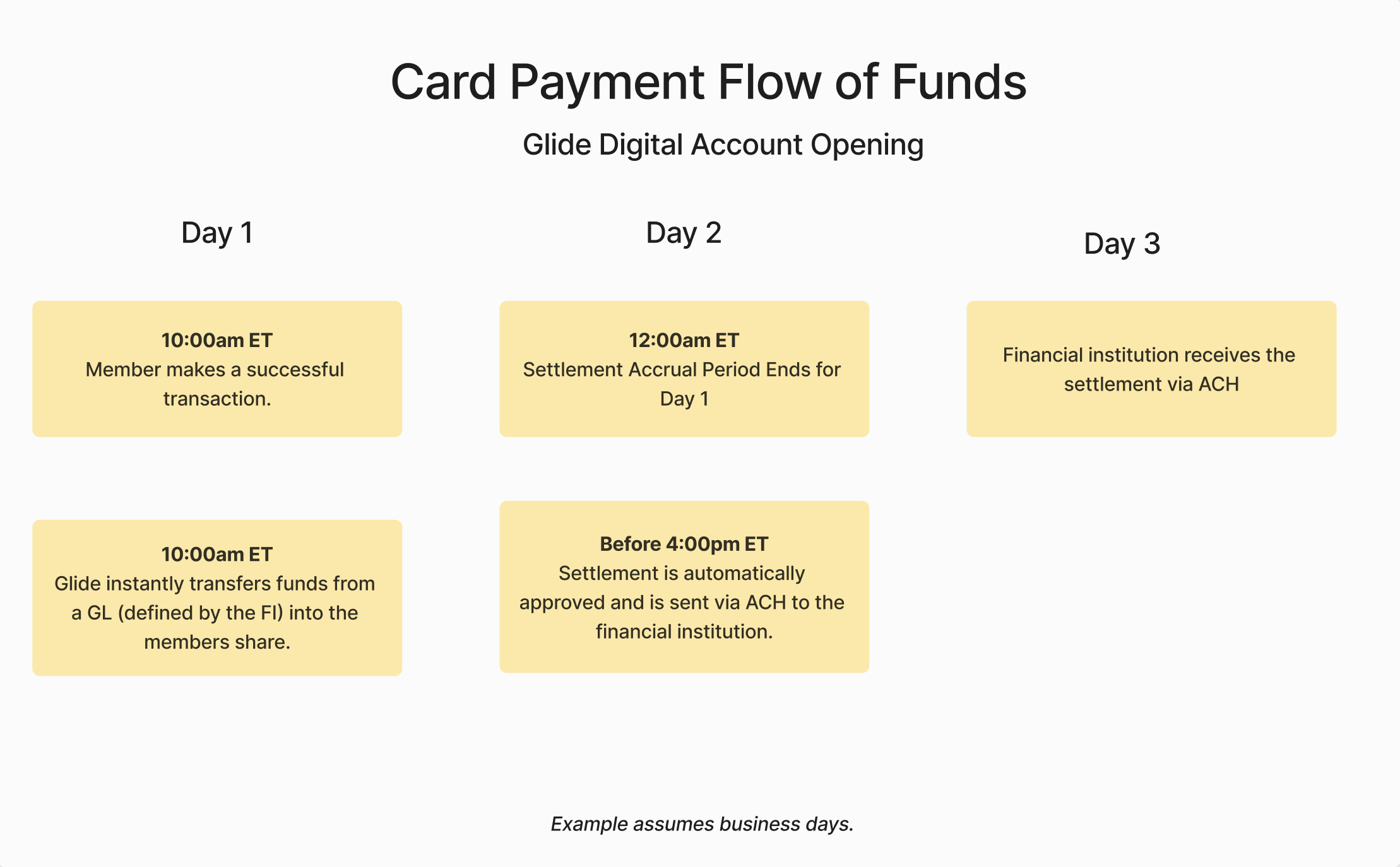
The diagram below outlines how funds move from the account holder’s card to your financial institution during the transaction and settlement process.
Notes on Settlements
Fees are deducted from the settlements before it is sent to the financial institution. Transaction breakdowns can be downloaded from the card payments dashboard. If any disputes or refunds occur, these will be taken out of the settlement for the following day. Settlements are automatically approved each business day. For transactions on weekends or federal holidays, the settlement is not approved until the next business day. FIs control which account and routing number the settlements are sent to. See our Card Merchant Onboarding Form Guide for more info. To update this after going live, please open a ticket with our team in Pylon
Who moves money into the account holder's account?
Settlement and account posting
Card settlement and posting a deposit to the account are separate steps. Glide can post card funding through the configured core integration using the institution’s GL configuration. Processing and availability depend on the integration and funding setup.
Notes on GLs
The core is the FI’s central system for managing accounts, and the GL (General Ledger) is a specific account in the core where funds from card transactions are posted.
Financial institutions can specify which GL account is used to transfer funds when an account holder completes a successful transaction (see Day 1 in the example above).
Symitar:
Please provide a 3 digit user defined GL code.
XP2:
Please provide a GL account in the format of: XXXX-XXXX.
Keystone:
Please provide a GL account in the format of: XXXXXX.XXXX.XXXX
Glide will request General Ledger codes for the following use-cases. You may use the same GL for all use-cases, or separate GLs.
Card Funding GL (Glide Knowledge Base guide)
NACHA Files GL (Glide Knowledge Base guide) [separate out from Provide GL Codes tasks]
Refer-a-Friend GL (Glide Knowledge Base guide)
Journey Promotions GL (Glide Knowledge Base guide)
Common Question: If the same GL code is used for all funding methods, will transactions be separated out within the NACHA file?
Answer: Yes.
Each item has a customizable transaction description based on the funding method (Card, ACH/NACHA, Refer a Friend, Journeys).
If those descriptions are unique and meaningful, a shared GL code is workable from an audit perspective.
Example: If the GL code is the same code used for all funding methods:
The GL code alone won't distinguish the transaction types. We'll include the custom description and the deposit type in the payload to the core
The custom description is stored on the core transaction and is the most auditor-friendly differentiator.
Examples:
"Card Funding"
"ACH/NACHA"
"Refer A Friend Reward"
"Journey Reward"
The deposit type would be:
Deposit (for Card and NACHA/ACH)
Referral
Promotion
There are also source codes attached to each transaction to break this down further:
The default value is "0" for Card and NACHA/ACH
The default value is "V" for Promotion and Referral
Notes on Allowable Card Types
Within the available configurations below, Glide can limit the type of cards that can be used for funding based on your FI requirements.
This code indicates whether the card is credit, debit, or prepaid.
| Description |
| Credit or Charge Card |
| Debit or Deferred Debit Card |
| HSA or FSA Card |
| Reloadable Prepaid Card |
| Unreloadable Prepaid Card (Gift Card) |
| Unknown |
🤓 Learn more: