Glide's Redesigned Onboarding Page
Last updated: September 23, 2026
Introducing the Redesigned Onboarding Experience
Building on our existing digital account opening process, the redesigned onboarding page makes it faster, simpler, and more intuitive for both new and returning account holders. Account setup, passkey management, and optional onboarding tasks are now brought together in a single, streamlined workflow, helping account holders get started and complete key actions with ease.
The interface also highlights essential account holder information and actions, allowing account holders to engage more efficiently while reducing friction throughout the onboarding journey. These enhancements are designed to simplify the process, improve usability, and provide a seamless start to the account holder experience.
Key Changes
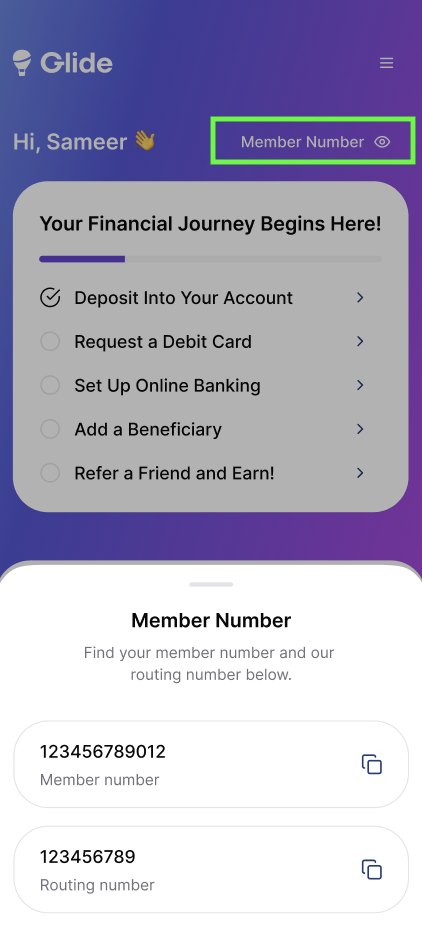
Masked Member Number: Member numbers are masked for increased security.
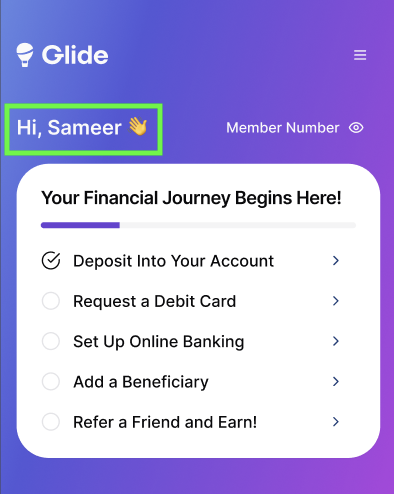
Enhanced Personalization: Friendly greetings and tailored experiences for each account holder.
Modern Onboarding UI: A new interface designed to improve user retention and daily active engagement with key onboarding actions.
Passkey Support: Integration with passkeys, including access to our passkey management system.
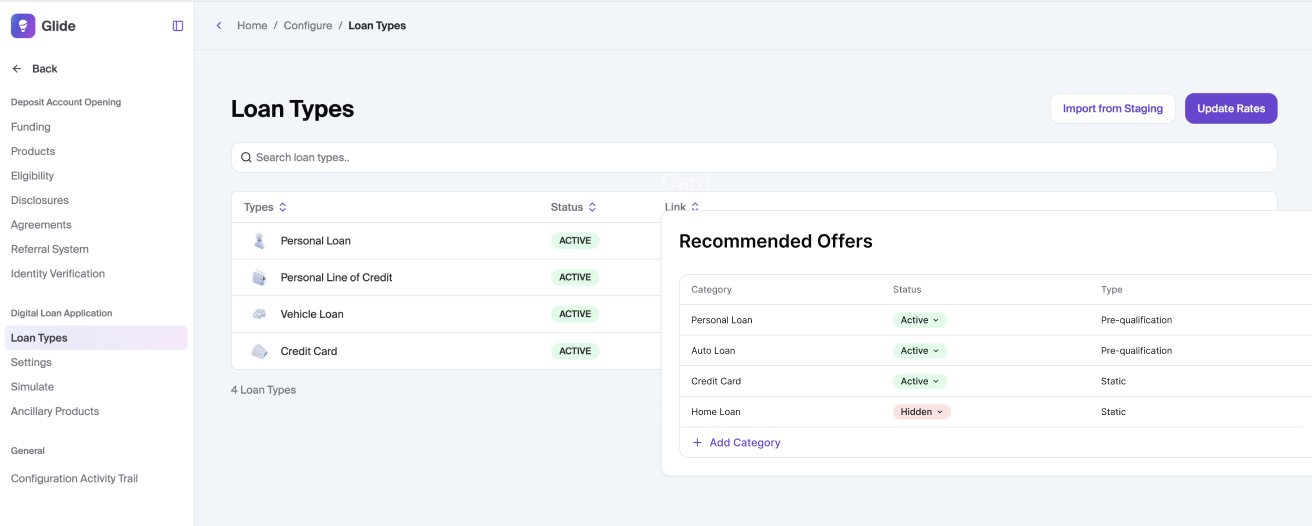
Admin-Controlled Offers: Ability to manage and control recommended offers directly from the admin dashboard (coming soon!).
DLA Platform Compatibility: Full compatibility with our DLA platform for a single, streamlined point-of-sale experience.
Masked Member Number
We’ve added a masked member number to enhance security while keeping information easily accessible. Account holders can click the masked number to reveal the full member number in a convenient drawer, providing quick access without compromising privacy.
Enhanced Personalization
Every account holder who logs into your financial institution’s onboarding portal will now see a personalized greeting. By displaying the account holder’s first name, we offer a more welcoming, tailored experience that helps foster engagement from the very first interaction.
Modern Onboarding UI
We now offer a modern onboarding experience for all of your account holders. At the top, the member number CTA reveals account and routing information.
Sections display dynamically based on configuration:
Deposit Into Your Account
Request a Debit Card
Set Up Online Banking
Add a Joint
Add a Beneficiary
Add a Share / Open New Account
Refer a Friend and Earn
Note:
The order of each item in this checklist is configurable. For example, Add a Joint can appear in any position, and the same applies to all other items.
These sections reflect the default options available for all financial institutions using DAO, and the display may vary based on your specific configuration. For example, you can toggle off certain sections listed above.
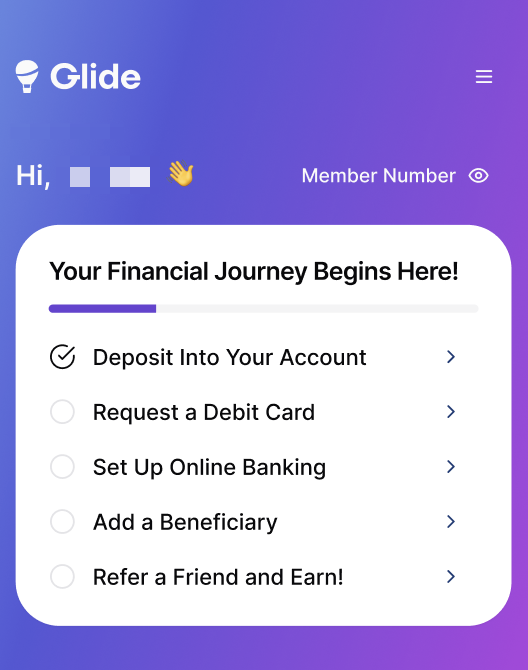
All sections appear or hide based on the institution’s configuration, creating a tailored onboarding experience for each account holder.
Optional Checklist Configurations
Financial Institutions (FIs) now have granular control over which checklist items appear in the portal. FI's can hide specific sections within the onboarding portal.
Items include:
Add a Checking Account
Add Account Button
Product Availability & Tab Filtering
To further simplify the account holder journey, FIs can restrict which products are available for selection during the "Add New Account" flow within the onboarding portal.
Configuration Capabilities:
Selective Product Display: You can choose to display only specific products (e.g., Certificates of Deposit/CDs) while hiding others like standard Savings or Money Market accounts.
Tab Removal: You may choose to remove entire product category tabs, including:
Recommended
All Products
Savings
Checking
Specific Product Disabling: Individual products can be disabled from the digital channel, such as Checking, Savings, or Money Market accounts.
Tab Order: Showing Checking Before Savings
By default, the product tab order on the account selection page is: Savings → Checking → Share Certificates. If the Recommended tab is enabled for your institution, it always appears first.
If your institution prefers to show Checking before Savings, this tab order can be reconfigured. When enabled, the Checking tab will appear first in the list and will also be the default active tab when an account holder lands on the page.
This applies both to the account selection page and to the product display order account holders see during the onboarding dashboard flow.
Note: If the Recommended tab is active for your institution, it will always take the first position regardless of the Checking/Savings order setting.
To change the tab order for your institution, please contact your Glide implementation or support team.
Passkey Support
Account holders are optionally prompted to create a passkey during onboarding, providing a passwordless, device-bound, and phishing-resistant way to access their accounts. Passkeys offer a faster, more secure login experience, allowing account holders to sign in with Face ID, Touch ID, or other device-based authentication.
Within the onboarding portal, account holders can manage up to five passkeys as well as adding, deleting, or rename existing passkeys.
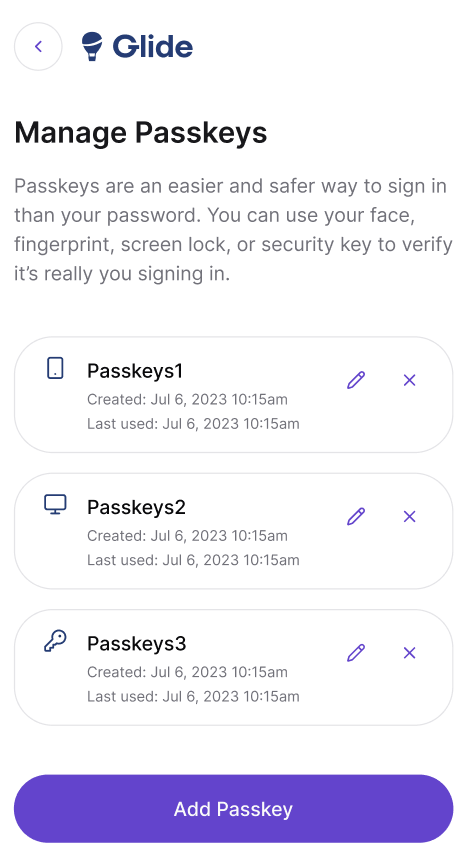
A fallback option using OTP and identity verification ensures access if needed. For financial institutions, passkeys reduce fraud risk, lower support costs, and streamline operations, while account holders enjoy a simple, convenient, and highly secure login experience.
Related Articles
See our Passkeys documentation for a full overview on Passkeys.
Admin-Controlled Offers [Coming Soon!]
Soon, administrators will have the ability to manage and control recommended offers directly from the admin dashboard. This feature will provide greater flexibility in tailoring loan offers to your account holders, ensuring that promotions are relevant, timely, and aligned with your strategic goals—all from a single, intuitive interface.
Key Benefits
Streamlined Onboarding: Account holders can complete all post-approval account setup, passkey creation, and optional tasks in a single, intuitive workflow, reducing friction and saving time.
Customizable Experience: Onboarding sections dynamically adjust based on your institution’s configuration, ensuring each account holder sees only the most relevant actions.
Enhanced Security: Passkeys provide a passwordless, device-bound, and phishing-resistant login option, improving account security while simplifying access.
Modern, Engaging Design: A clean, branded interface with friendly personalization increases account holder engagement and creates a welcoming first impression.
Simplified Account Holder Journey: Optional sections can be hidden for clarity, reducing cognitive load and guiding account holders through only the steps they need to complete.