Restricting Job Titles by Business Entity Type
Last updated: September 23, 2026
What this configuration does
In Glide's Business Account Opening flow, applicants are asked for a job title (sometimes labeled "Occupation") on the business owner details page. By default this is a free-text field, which means applicants can enter anything: "Owner", "CEO", "Big Cheese", typos, or titles that don't legally exist for the entity type they selected.
This configuration replaces the free-text input with a dropdown of job titles filtered by the business's legal entity type (Corporation, LLC, Sole Proprietorship, etc.).
Turn it on when you want to:
Standardize the data flowing into your core (no typos, no invented roles).
Make sure every owner's role is legally valid for the entity type they selected.
Improve accuracy of anything downstream that depends on title: signature pages, beneficial ownership verification, signer permissions, vendor skip rules, etc.
What the applicant sees
When the feature is OFF (default)
Business name page: applicant selects the Entity Type alongside Legal Name.
Owner details page: applicant types their job title into a free-text input (up to 40 characters). No validation against entity type. Anything is accepted.
Dashboard: your back-office team sees a free-text occupation field when viewing or editing an owner.
You can optionally show a subtext above the free-text field to nudge applicants toward specific titles, but it's only a suggestion.
When the feature is ON
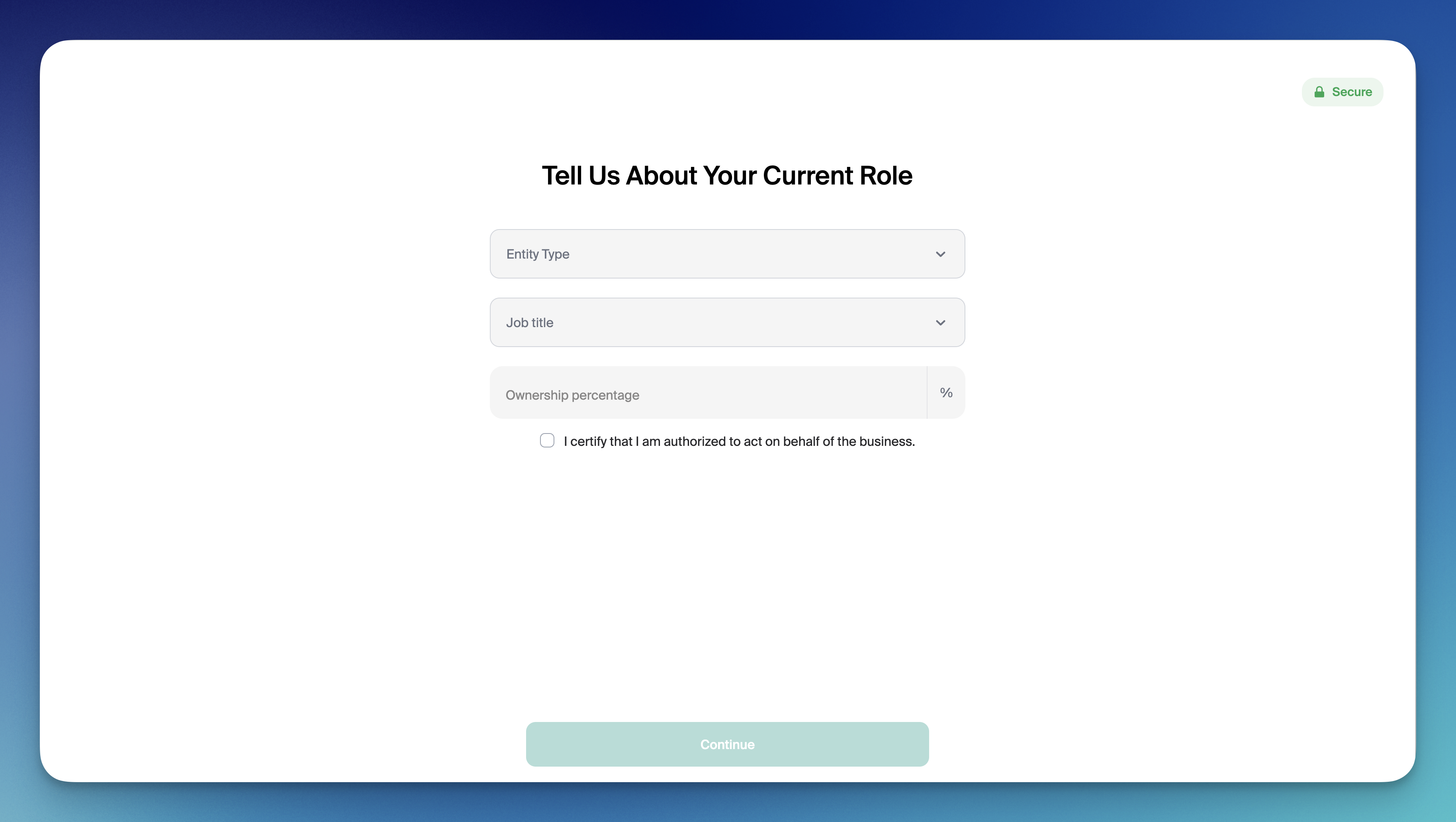
Owner details page now collects both:
Entity Type (only the primary applicant sees this; invited signers inherit it).
Job Title, as a dropdown whose options depend on the entity type chosen above.
If the applicant changes the entity type, the job title field clears automatically so they can't carry over a stale selection.
Business name page no longer asks for Entity Type, since it was already collected. The applicant only sees the question once, earlier in the flow.
Dashboard: back-office staff see the same restricted dropdown when editing an owner. Data stays consistent across applicant-facing and internal views.
What you can customize
1. Job titles per entity type
You define the mapping of Entity Type → Allowed Job Titles for your financial institution. Glide loads this into your config.
Example mapping:
Entity Type | Allowed Job Titles |
|---|---|
Corporation | President/CEO, Vice President, Secretary, Treasurer, Executive Director, Authorized Signer |
Organization/Club | President/CEO, Vice President, Secretary, Treasurer, Executive Director, Authorized Signer |
Non-Profit Organization | President/CEO, Vice President, Secretary, Treasurer, Executive Director, Authorized Signer |
General Partnership | Managing Partner, General Partner, Authorized Signer |
LP, LLP, or LLLP | Managing Partner, General Partner, Authorized Signer |
Limited Liability Company (LLC) | Member, Managing Member, Authorized Signer |
Sole Proprietorship | Sole Proprietor, Authorized Signer |
You can add, remove, or rename titles per entity type at any time. Every supported entity type must have at least one title defined, otherwise the dropdown will be empty for that structure.
2. Entity type list
The entity types themselves are governed by your FI's business structure list, not by this configuration. Most financial institutions adjust the entity type list and the title mapping together so they stay in sync. Common variations across FIs include adding "Association & Clubs", splitting nonprofit vs. for-profit corporations, or simplifying the partnership categories.
Related configuration: ChexSystems skip rules
Your FI can also uses an entity type + title map for a separate purpose: deciding which invited business signers skip ChexSystems checks. It does not affect what applicants see in the dropdown. It only governs which invited owners or signers bypass the ChexSystems report run based on the title they're assigned.
Worth knowing if you're configuring both at the same time, since the two lists usually need to be consistent.
Setup checklist
When you're ready to turn this on, send Glide:
Confirmation that you want this configuration on
Your final business entity type list, if it differs from the default.
Your entity type to job title mapping, with at least one valid title per entity type.
After the config change ships, applicants will go from "type any occupation" to "pick a valid title for the entity type you selected", and your back-office staff will see the same restricted dropdown in the dashboard.
How job title is sent to Symitar
When Glide submits a business account opening to a Symitar core, the job title entered or selected by a business owner is sent automatically as part of the standard integration. Because Symitar's person records don't have a dedicated "job title" field, Glide transmits it using the fields Symitar does support.
Default behavior: The job title is sent as the Occupation field on the owner's or signer's name record, and the business name is sent as their Employer. This applies to every owner and signer on the application and requires no configuration.
Optional structured mapping: Some financial institutions additionally want the job title recorded as a coded value — Symitar's Name Sub Type field, which classifies a person's role on a business account with a numeric code. For these financial institutions, Glide maps each title (for example, "Managing Member" or "President/CEO") to its corresponding number. This mapping is institution-specific and must be explicitly set up with Glide.
Unrecognized titles (mapped financial institutions only): If a title doesn't have a matching code in your financial institution's mapping, the Name Sub Type field is left unset for that person — the title is still sent as their Occupation.
If you want job titles recorded as a coded Name Sub Type rather than (or in addition to) the Occupation field, contact your Glide DPM to set up the mapping and review which titles are included.