Owners, Signers, and Control Persons in Glide's Business Account Opening (BAO) Flow
Last updated: June 30, 2026
Overview
This article explains how Glide collects the individuals tied to a business during the Business Account Opening (BAO) application: beneficial owners, authorized signers, and the control person.
Glide's BAO flow is built to collect the parties a financial institution must identify under FinCEN's Customer Due Diligence (CDD) rule, which covers each individual who owns 25% or more of the business plus one control person, alongside any authorized signers the business requires.
The core concept: ownership and signer status are separate
In Glide, "owner" and "signer" are independent attributes:
Ownership is determined by the ownership percentage the individual reports. Ownership percentage is reported to the core and the applicant is prompted to add owners with 25% or more
Signer status is whether the individual is authorized to act on the account. It is set by the applicant when adding the individual.
A single person can be any combination of these. Adding someone as a signer does not make them an owner, and adding an owner does not make them a signer.
The four roles Glide supports
Role | How Glide captures it |
|---|---|
Owner, not a signer | Added as a related party; applicant marks them as not a signer; the invitee reports their ownership |
Signer, not an owner | Added as a related party and marked as a signer; the invitee reports 0% ownership. |
Signer who is also an owner | Added as a related party and marked as a signer; the invitee reports ownership |
Control person (who may or not be an owner and/or a signer) | Selected by the applicant on the dedicated control person screen within the BAO application. |
The control person is the individual with significant responsibility to control, manage, or direct the business (for example, a CEO, CFO, or managing member). They are required regardless of ownership, and they may or may not also be an owner or signer.
How roles are captured in the flow
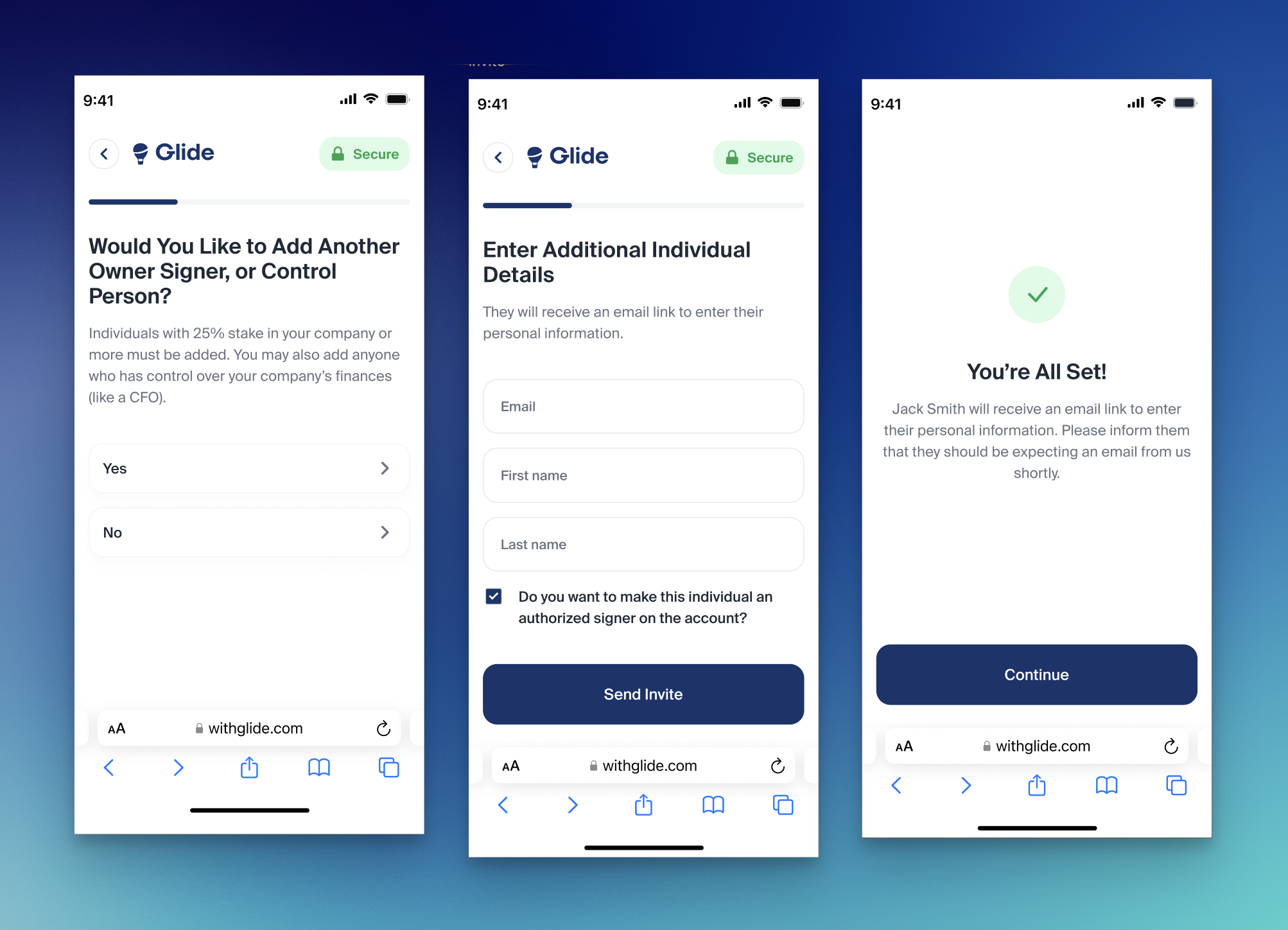
Add related parties. On the "Would you like to add another owner, signer, or other related party?" screen, the applicant adds anyone with 25%+ ownership and anyone with control over the company's finances. They can add as many individuals as apply.
Set signer status. When adding each individual, the applicant chooses whether that person is an authorized signer on the account using the "Do you want to make this individual an authorized signer?" checkbox. This is the only thing the applicant decides about that person's signer role.
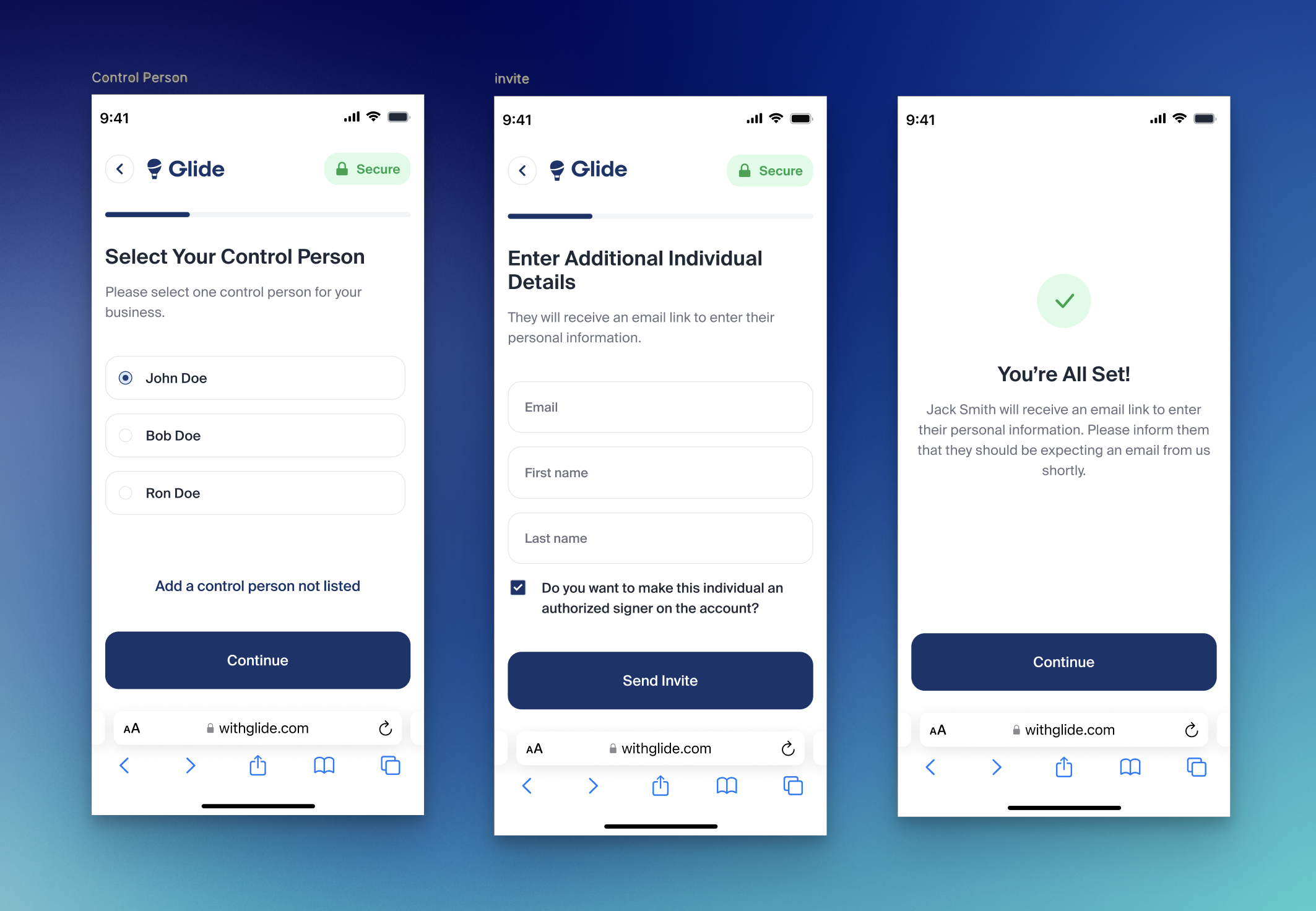
Invite the individual. The added person receives an email link to complete their own portion of the application. The applicant does not enter the other party's personal details.
Individual reports their own ownership. Through the invite, each person verifies their identity (via Plaid IDV), enters their job title, and reports their ownership percentage. This ownership percentage is how Glide determines whether the person is also a beneficial owner. It is reported by the individual, not assumed from how they were added.
Select the control person. On the "Select your control person" screen, the applicant chooses one control person from the people already on the application, or invites a new individual if not already listed.
Why this resolves the common confusion
Because ownership comes from the percentage each individual self-reports, the flow handles every combination cleanly:
An owner who should not be a signer can be added without signing authority. Their ownership percentage still registers them as a beneficial owner.
A signer who has no ownership stake (for example, an operations lead) can be added with signing authority and will not be treated as an owner.
A person who is both an owner and a signer is captured correctly without any duplicate entry. Marking them a signer and their reported ownership together produce the right result.
The control person is collected separately and is not dependent on ownership or signer status.
The practical takeaway for clients: Glide does not infer ownership from whether someone was added as a signer, or vice versa. The authorized-signer checkbox and the self-reported ownership percentage are two distinct inputs, and Glide combines them to produce an accurate picture of each related party.