Loan Application Links
Last updated: September 23, 2026
Overview
Glide supports extensive options for deep linking into specific loan flows and categories.
Note the URL path is shown below. Add this to the end of your root URL (e.g. FI-name.com) to create the full URL.
General Links
Onboarding Page and Recommended Offers
URL Path: /loans/apply
Example URL: FI-name.com/loans/apply
Use case: Share with applicants who would like to see what they are pre-qualified for, without a specific loan type in mind. They will be taken to the onboarding page where they will see pre-qualified recommended offers as well as the option to apply for any loan.
All Loans
URL Path: /loans/apply?page=all_loans
Example URL: FI-name.com/loans/apply?page=all_loans
Use case: Share with applicants who would like to apply for a loan but have not selected a loan type yet. After logging in, users will see a page where they can select a loan type to apply for.
Loan Specific Links
Use the below links to direct an applicant to a specific loan type.
Home Equity Loan
URL Path:
/loans/apply/home-equity-loanExample URL:
FI-name.com/loans/apply/home-equity-loan
Home Equity Line of Credit
URL Path:
/loans/apply/home-equity-line-of-creditExample URL:
FI-name.com/loans/apply/home-equity-line-of-credit
Personal Loan
URL Path:
/loans/apply/personalExample URL:
FI-name.com/loans/apply/personal
Personal Line of Credit
URL Path:
/loans/apply/personal-line-of-creditExample URL:
FI-name.com/loans/apply/personal-line-of-credit
Vehicle Loan
URL Path:
/loans/apply/vehicleExample URL:
FI-name.com/loans/apply/vehicle
Credit Card
URL Path:
/loans/apply/credit-cardExample URL:
FI-name.com/loans/apply/credit-card
Deep Links
Deep links are a way to direct a user to a specific category (e.g. Personal Loan -> Medical Expense) or sub-category (e.g. Vehicle Loan -> Boat -> Sailboat).
Commonly, deep links are used on lender websites where they list the various loan types they offer, each with its own deep link. Users who enter the application via deep link will not be asked for the category/sub-category of loan they are looking to apply for.
How to find your deep links
The specific deep links will differ depending on your categories/sub-categories and their names. To find your deep links:
Open the Glide Dashboard and navigate to the Configure option in the sidebar
Select Loan Types under Digital Loan Application
Select the Loan Type you are interested in
In the Categories table, you will see each category along with the deep link associated with it
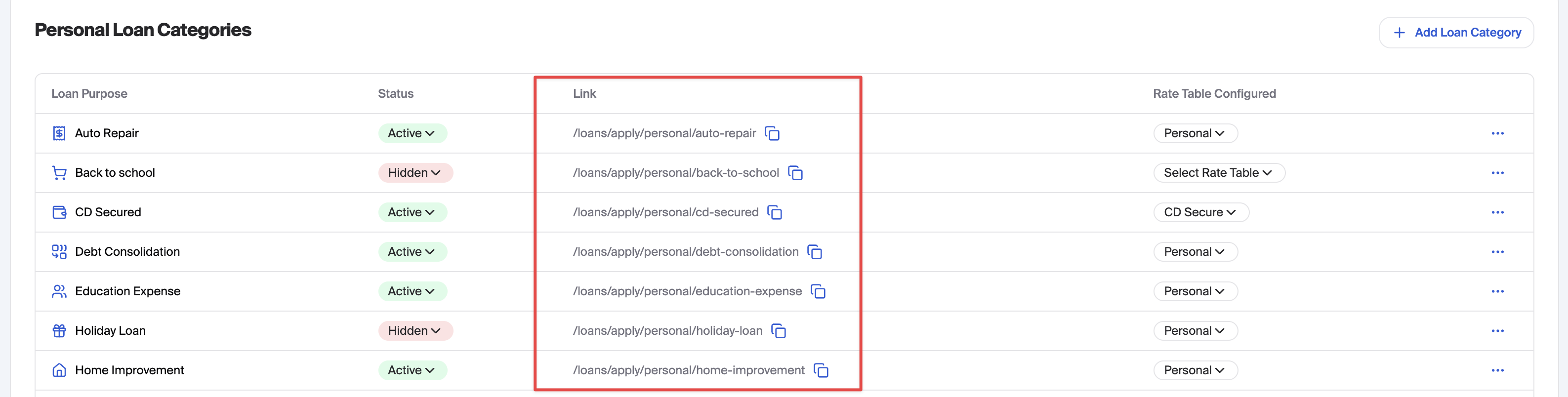
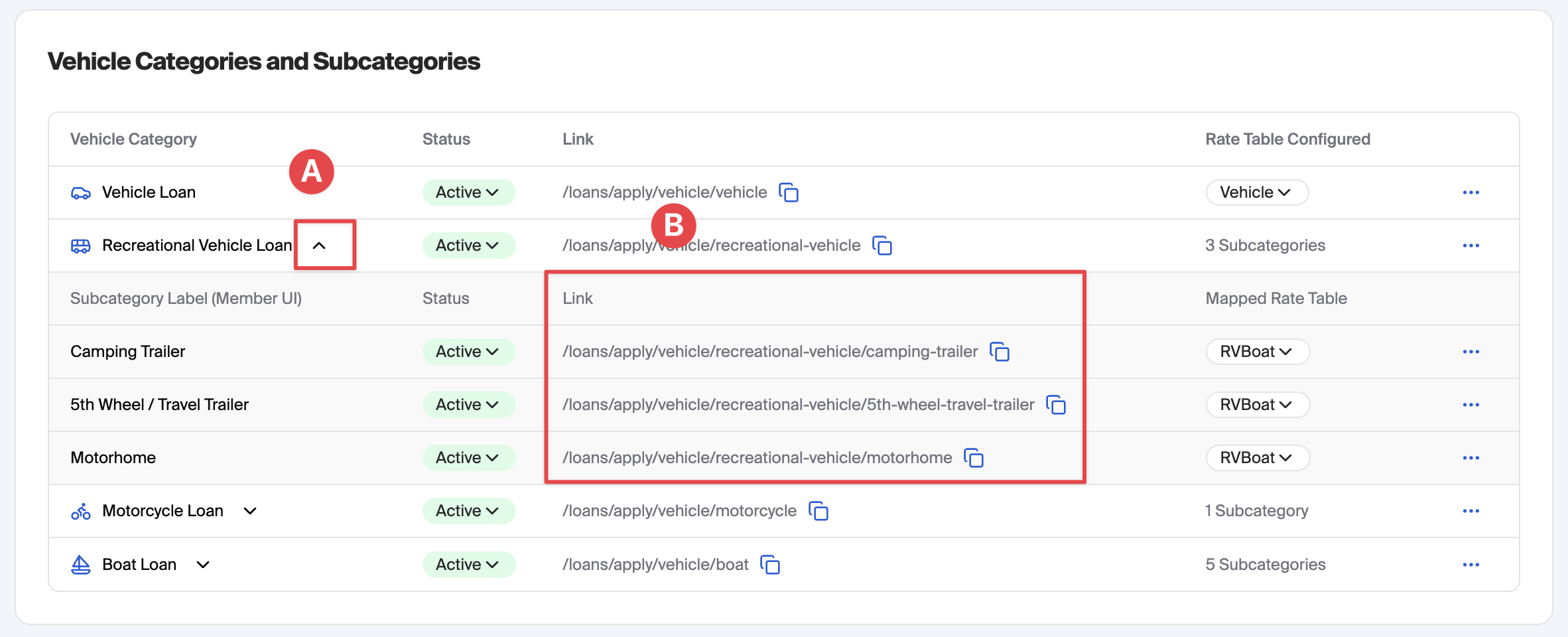
If you have sub-categories configured, you can
Expand the row
See the deep links for the sub-categories
Loan Category Statuses: Active vs. Active via Link vs. Hidden
Each loan category (and sub-category) has a status that controls how — and whether — applicants can reach it. There are three possible statuses:
Active: The category is fully publicly available. It appears in the standard applicant-facing loan application menu, and any applicant can browse to it and apply without needing a special link.
Active via Link: The category is live and accepting applications, but it is not listed in the standard applicant-facing menu. Applicants can only reach it if they are sent a direct deep link to that specific loan type. This is useful for targeted promotions, pilot programs, or niche products you do not want all applicants to see when browsing the application.
Hidden: The category is not accessible to applicants at all, regardless of whether they have a link.
Important: If every category within a loan type is set to Active via Link (with none set to Active), that loan type will not appear as a selectable option in the standard digital channel at all — applicants must use a deep link to reach it.
Resume Links for In-Progress Applications
A resume link allows you to direct an applicant back to a loan application they have already started. Resume links use the same URL as the deep link for that loan type — there is no separate resume URL to construct.
For example, the resume link for a Home Equity Loan application is the same as the Home Equity Loan deep link:
URL Path: /loans/apply/home-equity-loan
Example URL: FI-name.com/loans/apply/home-equity-loan
When an applicant arrives via this link, they will be prompted to confirm their phone number, a one-time passcode, and date of birth. After verification, they will be asked whether they want to resume their existing application or start a new one. If they choose to resume, they are returned to where they left off.
Note: Future improvements are planned so that resume links will take applicants directly into their existing application without the resume-or-new prompt. Until that change is released, the verification and selection step described above applies.