Configuring Your Digital Loan Application: Personal Line of Credit
Last updated: September 23, 2026
Overview
This guide covers the specific settings for the Line of Credit product, including default loan criteria and rate table configuration to ensure a seamless applicant experience.
Default Loan Criteria
Set the baseline repayment logic for the product.
Line of Credit % Minimum Payment of Balance: Define the minimum percentage of the outstanding balance that a borrower must pay each month (e.g., 2%).
Rate Table Management
Before making changes, it is important to understand how these two components work together:
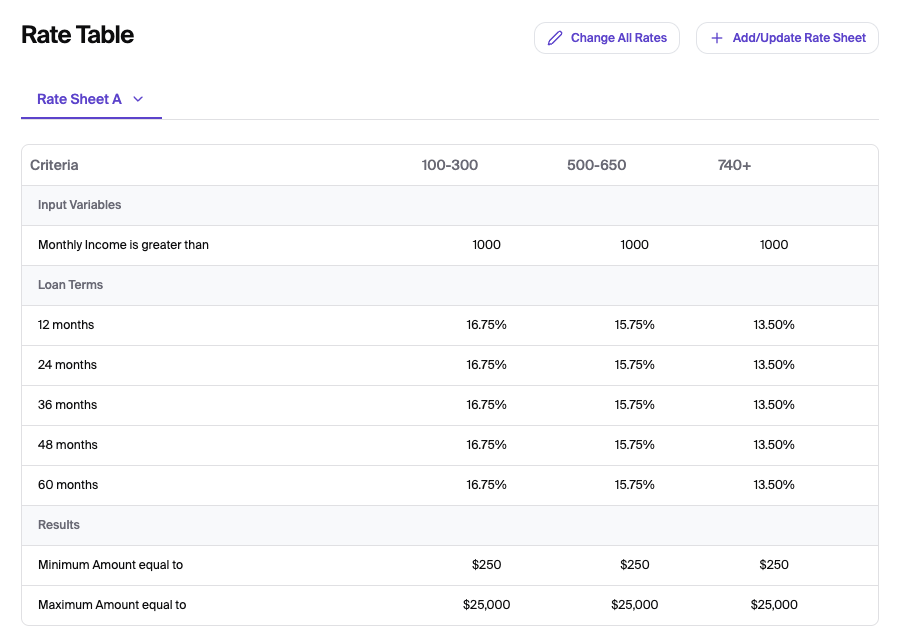
The Rate Table (View-Only): The table you see on your dashboard screen is a live preview of your current configuration. It displays rate sheets that have your active tiers, interest rates, criteria's and loan limits but cannot be edited directly on the screen.
The Rate Sheet (Editable File): To change any data in the table, you must download the Rate Sheet (Recommended) or Start From Blank template, update it in Excel, and re-upload it. This sheet acts as the "source of truth" that updates the dashboard view.
Please see the How to Update Your Rate Sheet Guide for Rate Updates
Saving
Save: Click the Save button at the top right of the page to store your configurations.