Sync Core Data in Glide
Last updated: October 21, 2026
Overview
Sync Core Data ensures financial institutions always have accurate, real-time account holder information, reducing costly errors and manual reconciliation. It automatically reflects updates from your core system for select fields, whether from back-office actions or automated processes. Glide helps staff work efficiently with up-to-date account holder information, reducing errors, saving time, and ensuring every decision is based on accurate data.
By keeping data in sync across systems, Core Data Sync helps your FI:
Reduce manual reconciliation and data inconsistencies
Improve staff confidence when reviewing or servicing memberships
Maintain a clear audit trail of when and how account holder data changes
Syncs are field level, transparent, and protected by built in safeguards to prevent unnecessary load on your core.
Sync Core Data at a Glance
Core System → Glide (automatic and manual syncs) → Staff and Account Holder Dashboards with safeguards and audit trail
When Core Data Sync Runs
1) Automatic sync on dashboard load
When a staff member opens a membership dashboard, Glide automatically checks whether a sync is needed.
A sync runs if at least 1 minute has passed since the last sync
Repeated page reloads within that window will not trigger additional core calls
This ensures data stays fresh without impacting core performance
2) Account holder login via digital channel
When a known account holder logs in through the digital channel, Glide automatically syncs core data.
Sync runs even if a recent sync already occurred
Ensures account holder initiated activity always reflects the latest core data
3) Manual Sync from the Account Holder Dashboard (XP2 only, available by request)
The manual Sync Core Data option is currently built only for financial institutions on the XP2 core. It is not turned on by default. If your FI uses XP2 and would like it, contact your Glide team to request it. It is not available for other cores, including Symitar and Keystone.
When enabled, staff can trigger a sync on demand:
Open the account holder’s application in the dashboard.
On the applicant detail page, open the actions dropdown menu.
Select Sync Core Data.
The option only appears for memberships that have a member number, and only for staff with the right management permissions on that membership. If the sync works, a confirmation appears and the page refreshes. If it fails, an error message appears and the attempt is recorded in the activity trail.
If you don’t have the manual option, your data still stays current through the automatic syncs described above. To pick up a recent change made in the core, wait about a minute and reopen the application.
What Data Is Synced
Membership
Membership status
If your core does not support dedicated membership statuses, such as XP2, Glide uses the primary individual’s status as the membership status.
Individual Account holder Information
The following individual level fields are synced from the core:
First name
Last name
Phone number
Email address
Physical address
Income
Employer
Occupation
Roles
Role changes made in the core are reflected in Glide after a sync.
New roles added in the core appear in Glide
Updates to the primary role are reflected
Role removals are supported when enabled
All role changes are reflected in both the Glide UI and the activity trail.
Note: Role removal requires a production configuration flag to be enabled for your FI.
Shares
The following share level data is synced from the core:
Share status
Active balances
Newly opened shares
Adding shares, closing shares, and removing shares are supported.
Activity Trail and Visibility
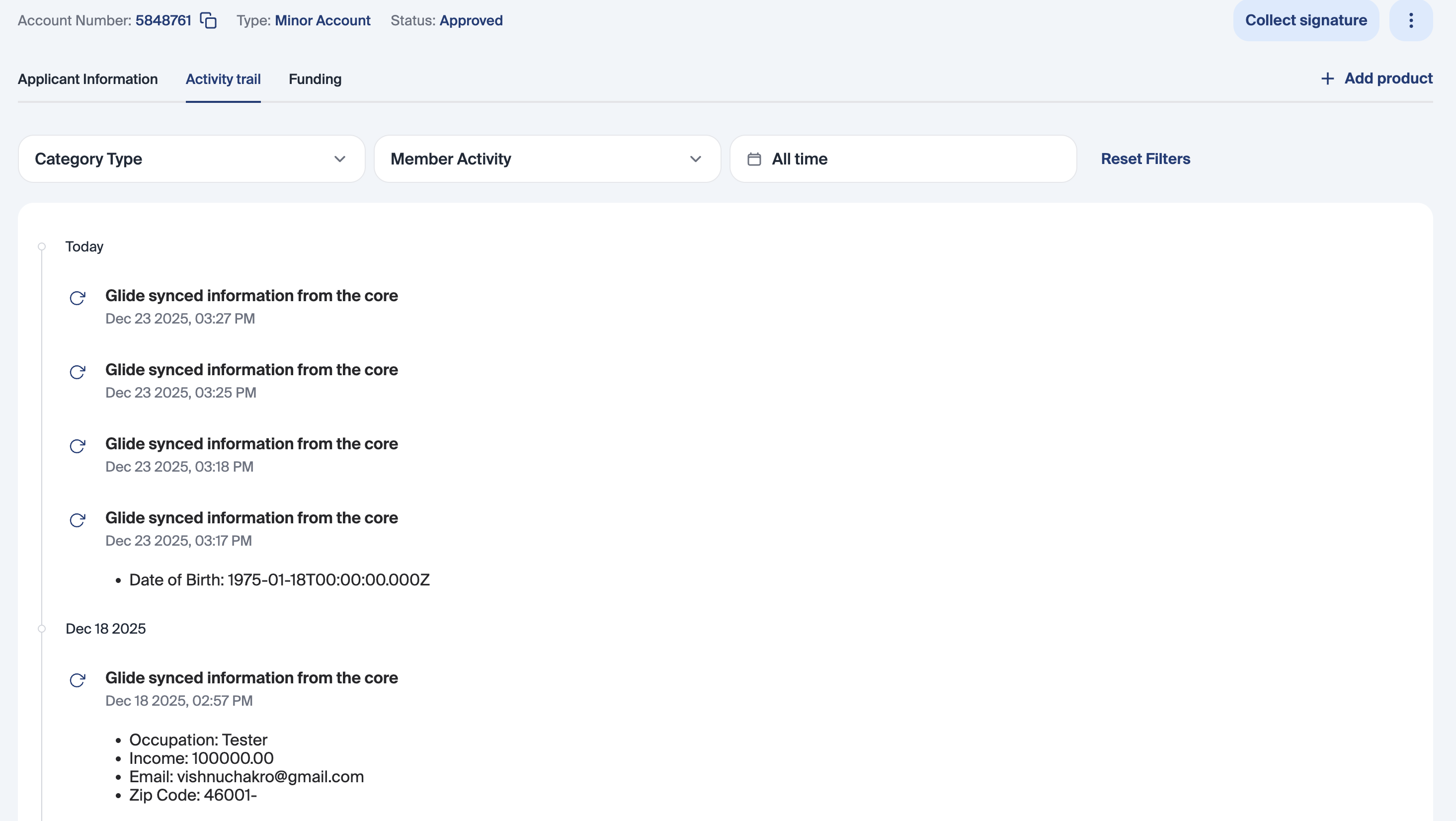
Every sync attempt, whether automatic or manual, is currently recorded in the activity trail, even if no data changes occur.
Each log includes:
Timestamp of the sync
Fields that were updated, if applicable
This provides staff and auditors with clear visibility into when data was last refreshed and what changed.
Performance Protection
Core Data Sync includes built in protections to prevent excessive core calls:
Dashboard reloads do not trigger repeated syncs within one minute
Only one sync can run at a time per membership
Manual syncs cannot be spammed
These safeguards ensure reliable performance for both Glide and your core system.
Error Handling and Notifications
If a sync fails due to a core timeout or error:
The failure is logged
The activity trail records the sync attempt
Staff see a toast notification explaining the error
This ensures failures are visible and actionable without silently leaving data out of date.
Supported and Upcoming Sync Coverage
Currently Supported
Membership
Membership status
Individual
First name and last name
Phone number, email, and address
Income, employer, and occupation
Roles, including new roles and primary updates
Shares
Status
Active balances
Newly opened shares
In Progress (by Glide)
Role removals
Overdraft protection services
Courtesy pay
Debit cards
Why Core Data Sync Matters
Core Data Sync ensures Glide remains a reliable, real time extension of your core system. By combining automatic refreshes, staff controlled syncs, and a complete audit trail, your FI can operate with confidence knowing the data your teams rely on is accurate, current, and transparent.