Glide Signature Card Generation
Last updated: October 22, 2026
Overview
Signature cards capture membership and account details, accepted disclosures, and signature records for applications completed online or with staff. Cards can be generated automatically after approval or manually by staff from the dashboard, including during in-branch account opening, depending on your institution's configuration and signature requirements. Glide provides standard signature cards, with the option to use your institution's own template through a custom implementation.
For staff-assisted applications, signatures can be collected in branch using a Topaz signature pad or through a link or QR code. The generated card provides a record of the signature or electronic acceptance, along with available details such as the date, time, IP address, and device information.
Signature Cards by Membership Type
Glide's standard signature card dynamically adapts to the membership type. The sections below explain how the card works for each membership type.
Personal Memberships
The personal membership card records the applicant's membership and account details, selected products, preferences, accepted agreements, and signature information. Joint owners and beneficiaries appear on additional pages when applicable.
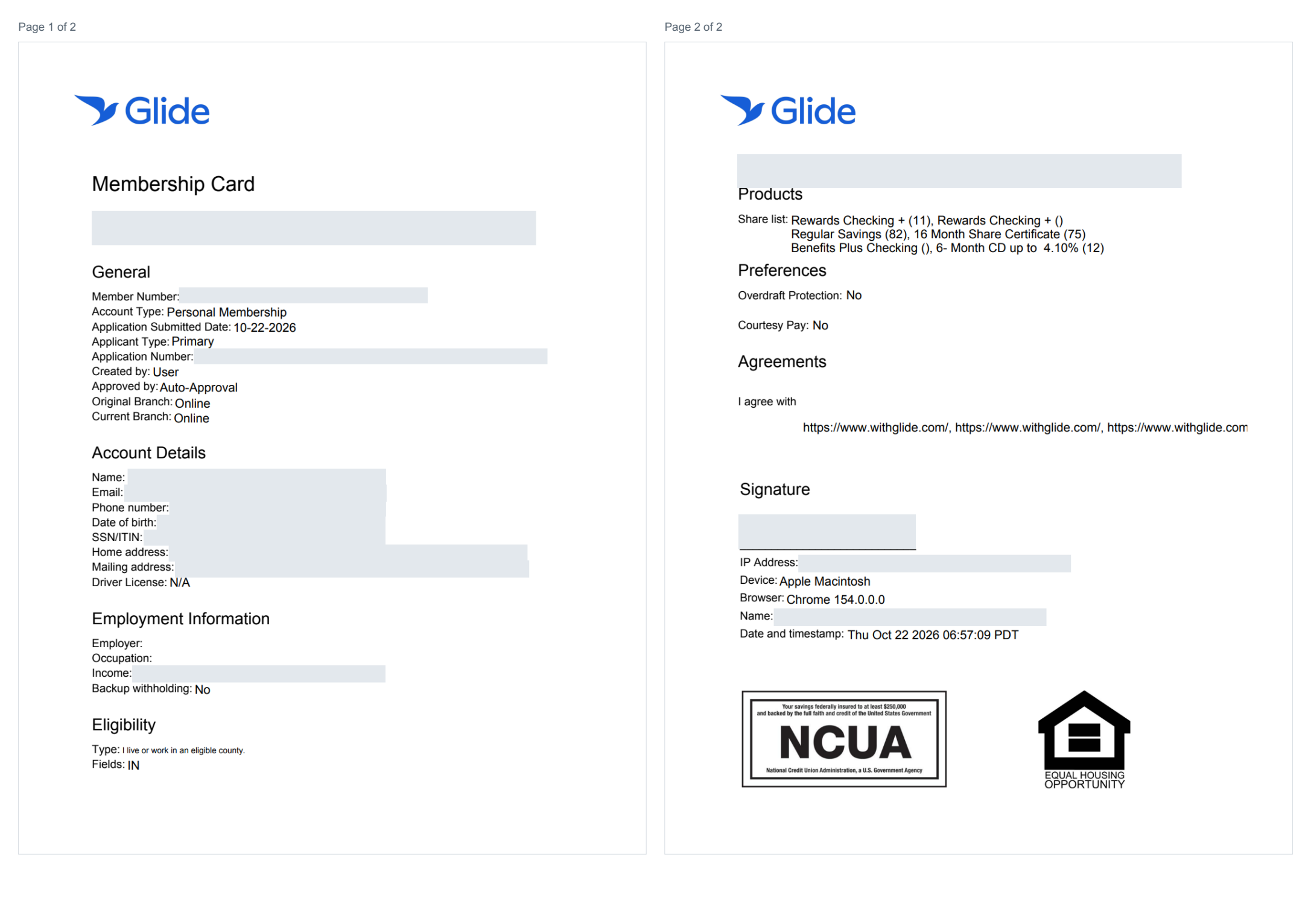
Complete personal membership card example, with both pages shown side by side. Identifying details are hidden. Select the image to enlarge it.
View all personal membership card fields
The card can include the following fields, depending on your institution's configuration and the information collected in the application.
Financial Institution Branding
FI name and logo
General Information
Member Number: Membership number
Account Type: Personal, minor, business, etc
Application Submitted Date: Date submitted
Applicant Type: Primary or joint
Application Number: Glide internal tracking number
Created By: Staff or applicant
Approved By: Name of approving staff member
Original Branch: Where application started
Current Branch: Where approved (physical location or digital channel)
Account Details
Member Name
Email
Phone Number
Date of Birth
SSN/ITIN
Home Address
Mailing Address
Drivers License Number
Employment Information
Employer
Occupation
Income
Backup Withholding
Eligibility
Type: Eligibility criteria defined by the FI
Fields: Additional information about the eligibility type
Example: Type = location-based eligibility; Field = Oklahoma
Products
Share List: Products selected during application
Preferences (optional)
If enabled in the digital channel, preferences such as Overdraft Protection (ODP) and Courtesy Pay can be included:
Overdraft Protection: Yes/No
Courtesy Pay: Yes/No
Agreements
List of all disclosures the applicant agreed to (may vary by FI). Examples:
eSignature Agreement
Privacy Notice
Membership Agreement
Truth-In-Savings Disclosure
Fee Schedule
Signature Information
Signature or electronic acceptance: The record captured through your institution's configured signing flow
IP Address: From submission
Device: Device used (e.g., iPhone, desktop)
Browser: Browser used (e.g., Chrome, Safari)
Name: Applicant’s name
Date & Timestamp: When signature captured
Minor, Custodial, and Teen Memberships
The standard signature card adapts to minor, custodial, and teen memberships. The card records the account holder's information, selected products, applicable preferences and agreements, and the additional people and signatures captured for that membership, such as a parent, guardian, custodian, or joint owner.
The membership type and participating roles follow the application. Required signers and the information collected can differ between minor, custodial, and teen products.
Guardianship and Power of Attorney: When these membership types are enabled, they follow the same shared generation path. The membership type and configured roles determine the account and signing arrangements.
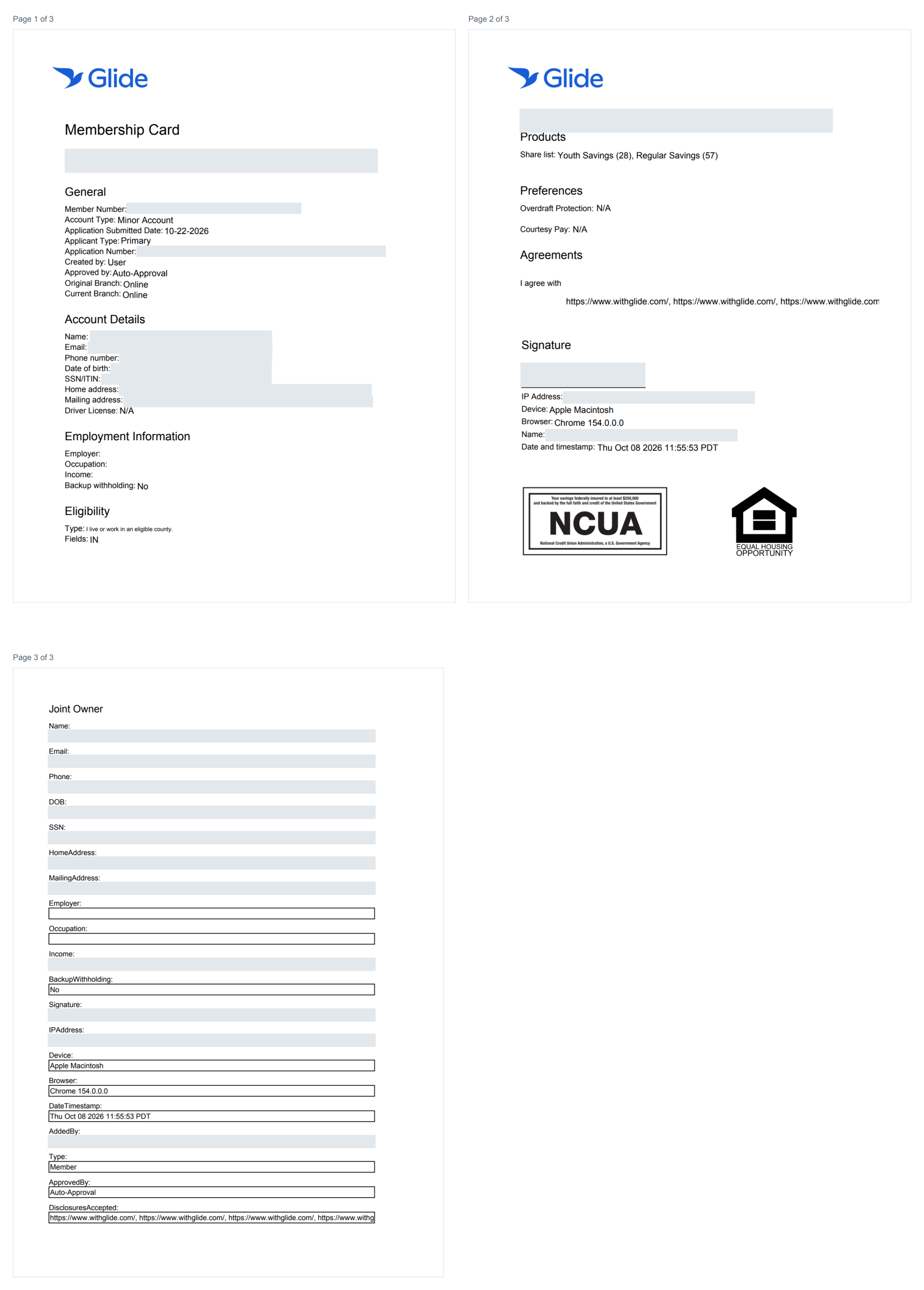
Complete minor card example: page 1 contains the primary applicant's details; page 2 contains products, agreements, and signature information; page 3 contains the joint owner's details. Custodial and teen cards adapt to their configured account type and roles. Identifying details are hidden.
Trust Memberships
Trust memberships can use Glide's standard membership signature card to record the participating individuals, their roles, selected products, accepted agreements, and signatures. Additional participants can appear on separate pages with roles such as Trustee, Trustor, or Successor Trustee.
Some financial institutions use their own dedicated trust account card. The document's name and layout may therefore differ from the shared Glide signature card.
Estate memberships: When enabled, estates follow the trust-style generation path, using the estate's participating roles, such as Executor. Availability depends on your financial institution's configuration.
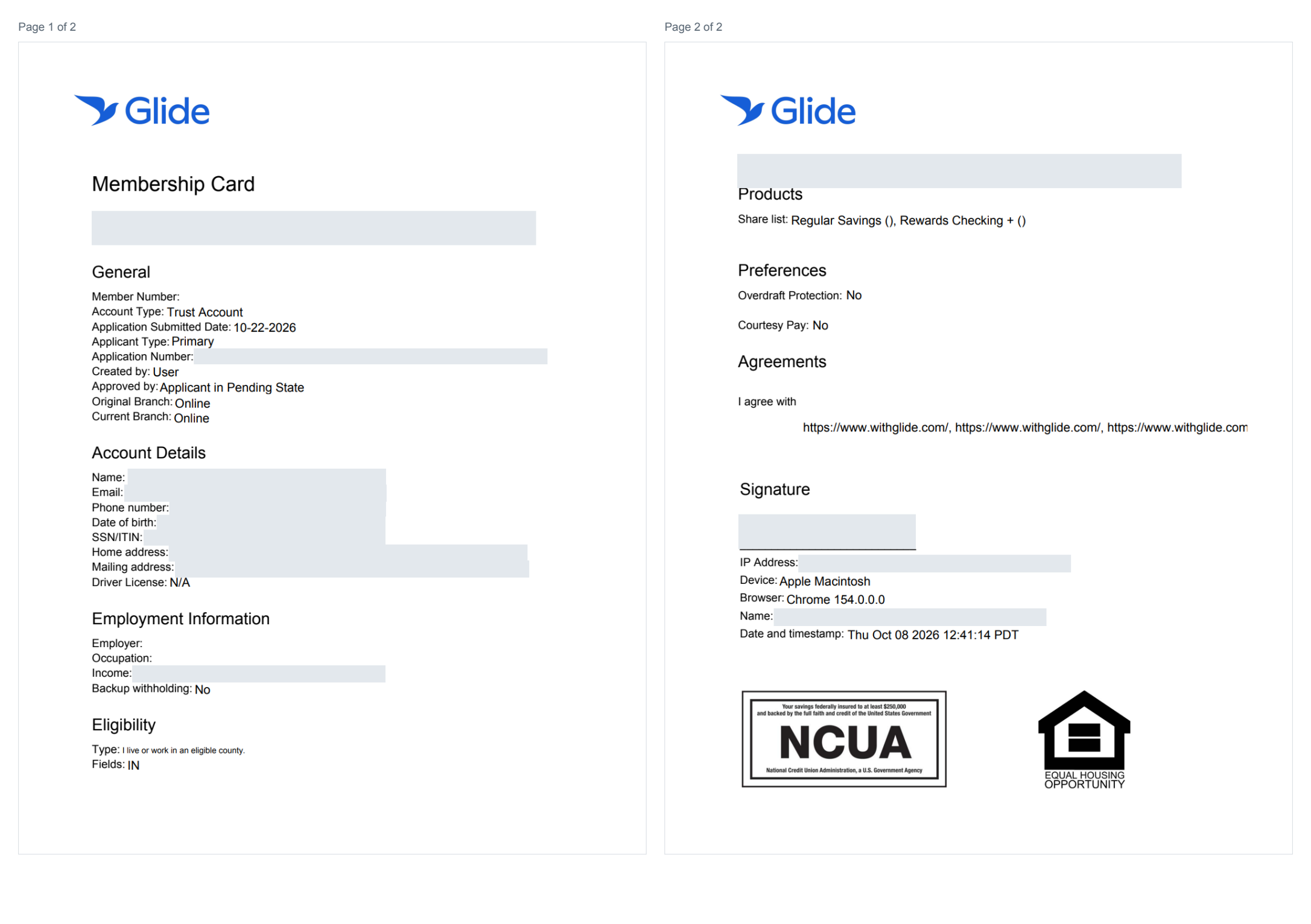
Complete trust card example: page 1 identifies the Trust Account and records the applicant's details; page 2 contains products, agreements, and signature information. This sample was generated while the application was pending, so its member number and approval information are not final. Identifying details are hidden.
Business Memberships: Two Standard Cards
Glide offers two separate standard documents for Business Account Opening (BAO). Each can be enabled for your institution.
1. Standard Business Signature Card
The business signature card is the membership and account record for the business. It brings together:
Business details, including business name, DBA, entity type, tax identification number, addresses, and contact information.
Application and membership information, eligibility, selected products, and applicable account preferences.
Owner and authorized-signer details, including role, title, ownership percentage, and control-person designation where applicable.
Accepted agreements and signature records.
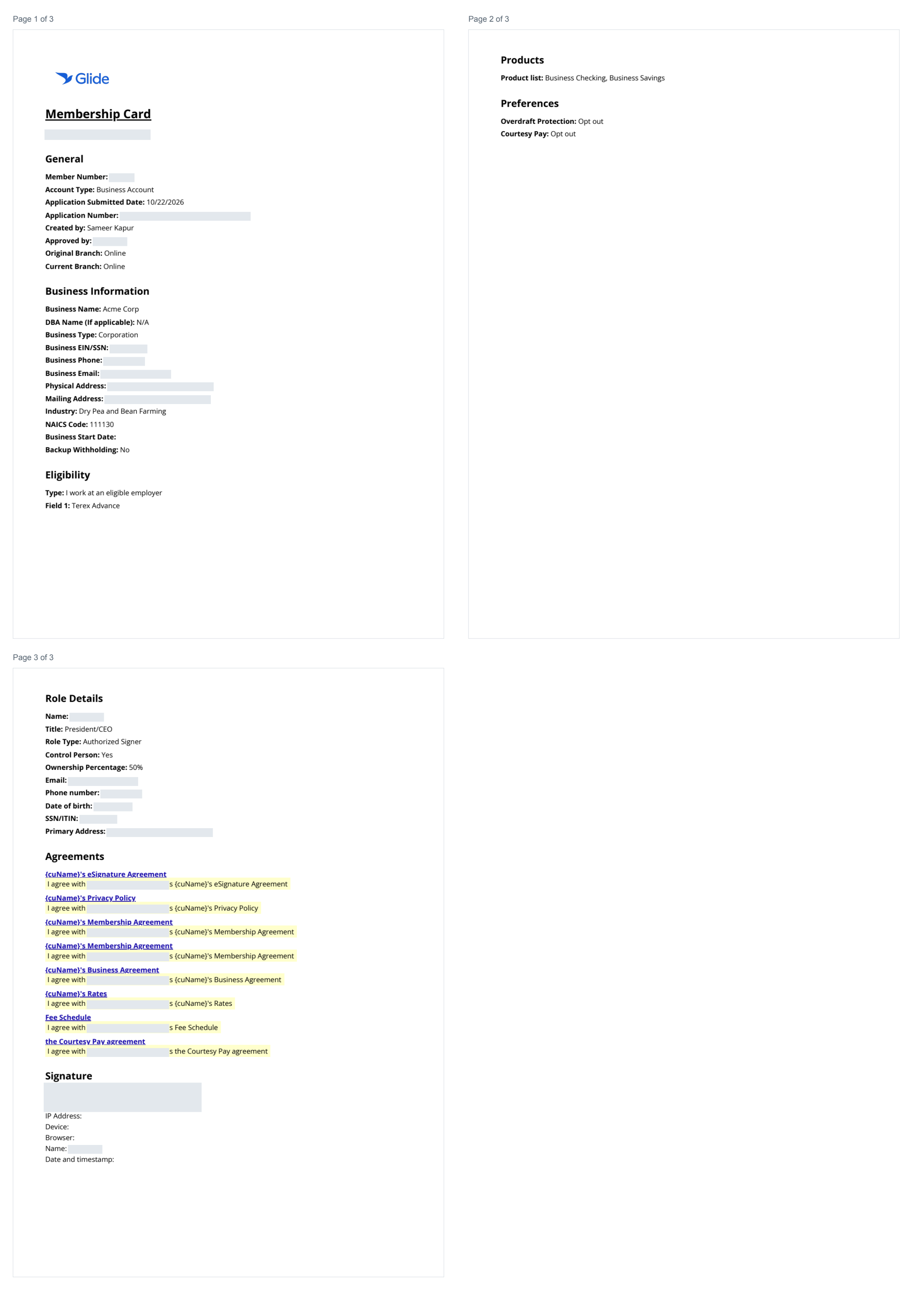
Complete business card example: page 1 contains the membership record, business information, and eligibility; page 2 contains products and preferences; page 3 contains owner/signer details, agreements, and signature information. Identifying details are hidden.
2. Standard Beneficial-Owner Form
The beneficial-owner form is a separate certification using the standard FinCEN template. It documents the business, its beneficial owners, and its control person, together with the certification section.
This form serves a different purpose from the business signature card. It does not replace the business account's membership agreements or signature card. Whether it is offered depends on the entity type and your institution's configuration; the standard generation path excludes sole proprietorships.
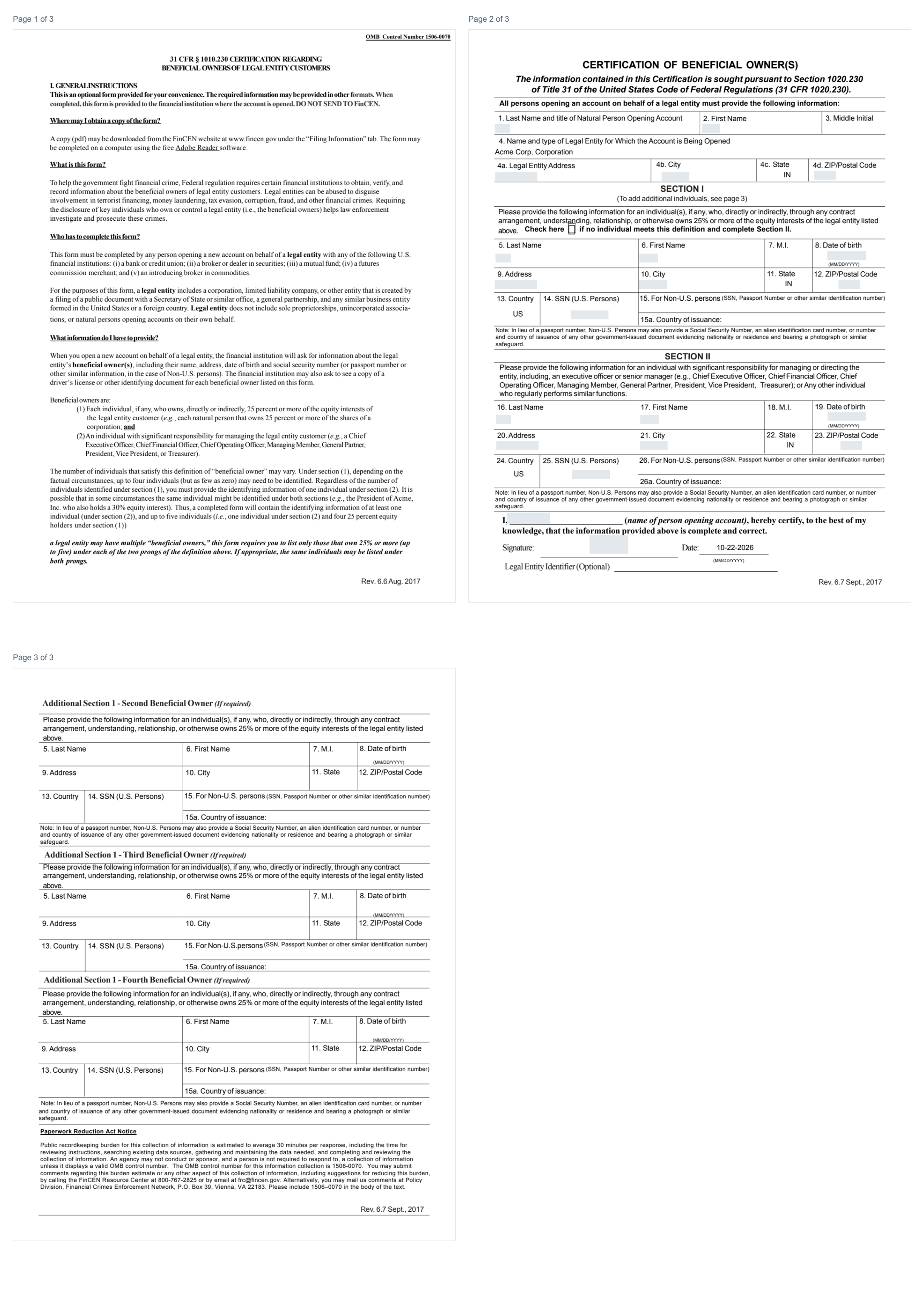
Complete beneficial-owner form example: page 1 contains the instructions; page 2 contains the business, beneficial-owner, control-person, and certification sections; page 3 provides space for additional beneficial owners. Identifying details are hidden.
Generating the Signature Card:
Glide provides multiple ways to trigger generatation of a signature card, either automatically through the Applicant Experience or manually via the Staff Dashboard, ensuring every approved application is properly documented.
Signature Card via Applicant Experience:
For configured digital applications, Glide generates the signature card after the applicable approval and signature requirements are met. The card records the electronic acceptance and signature information collected during the application. To ensure all required information is captured on the card, applicants simply need to complete a few steps in the Applicant Experience.
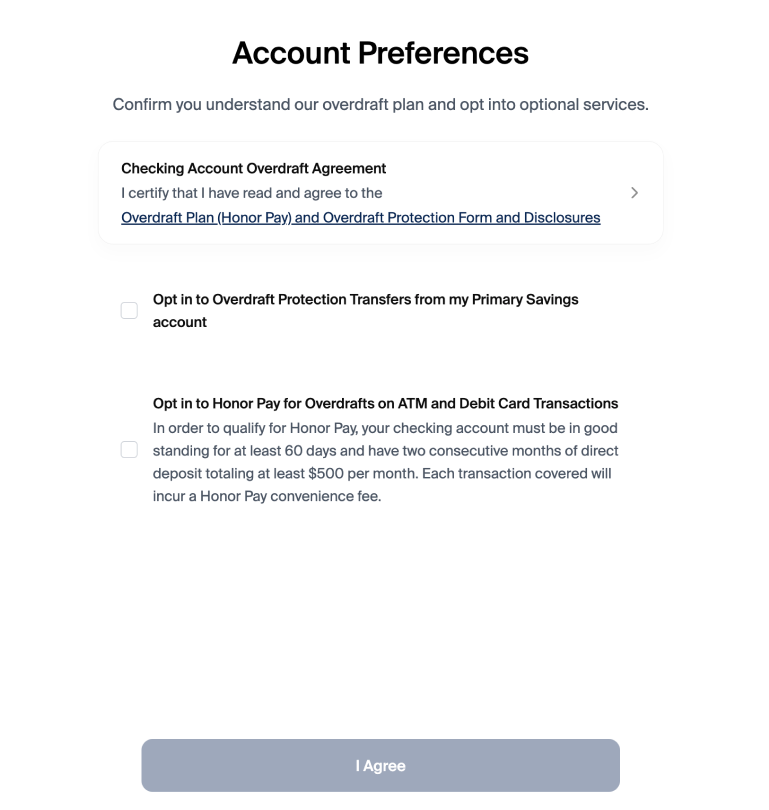
Step 1: Preferences Page (if enabled)
If enabled, applicants review the Financial Institution’s required preferences such as Overdraft Protection or Courtesy Pay. Their selections are automatically included on the signature card.
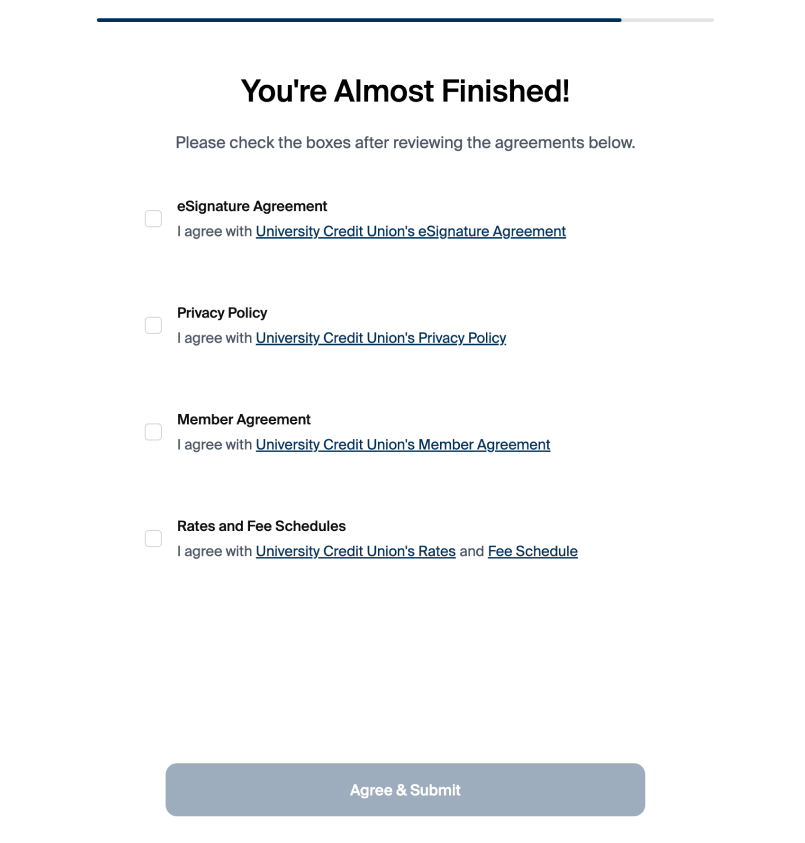
Step 2: Disclosures Page
Applicants must review and agree to all required disclosures before submitting their application. All agreed disclosures are captured and appear on the signature card.
Signature Collection via Staff Dashboard:
When needed, staff can manually collect or regenerate signature cards using the dashboard. Signature collection options include:
Signature Pad (in-branch)
Link/QR Code (remote collection)
Configuration Options
1. Default Behavior
When Glide's standard signature card is generated by default:
Application Approval: A signature card is generated upon approval of an application submitted via the digital channel.
Joint Owner Addition: A signature card is generated whenever a joint owner is added via the digital channel, regardless of whether the approval is automatic or manual.
2. Optional Configurations
These settings allow additional flexibility beyond the default behavior:
Generate Signature Card for Share Products:
Automatically issue a signature card when certain share products are added.
Can be configured to target specific share product types.
Example: Automatically generate a signature card when checking accounts are added via the digital channel.
Channel-Agnostic Generation:
Choose to generate signature cards automatically regardless of submission channel.
Default behavior limits generation to actions performed via the digital channel.
Generation Post-Addition of Beneficiaries:
Automatically generate signature cards following the addition of beneficiaries as well.
Plain-text Signature Option:
Show plain text in the signature box. Instead of the auto-generated cursive signature, we can provide the printed plain text name.
Custom Signature Card Support
Using Glide's standard templates does not require a Product Change Request (PCR). If an existing application question is missing from the standard card and is confirmed as a product gap, Glide can add it to the shared template without a PCR.
If your FI requires its own template or information outside the application, contact your Integration Team (DPM) to scope a custom card. Custom-card work requires a PCR and may carry additional fees.
Providing Signed Documents to Applicants
Glide does not currently support providing a copy of signed forms (such as the signature card, beneficial owner form, or entity authorization form) directly to the applicant after signing.
Signed documents are automatically delivered to the financial institution's document storage system (via SFTP) upon approval. Distribution of these documents to applicants after signing would need to be handled by the financial institution outside of Glide.
Glide can, however, include links to a static list of disclosures within the welcome email sent to applicants after account approval. Contact your DPM to configure disclosure links in your welcome email template.