Fraud Override Reason Requirement
Last updated: August 25, 2025
The Fraud Override Reason Requirement is an optional configuration designed to require staff to confirm they are overriding fraud check failures and state a reason when approving a membership or role.
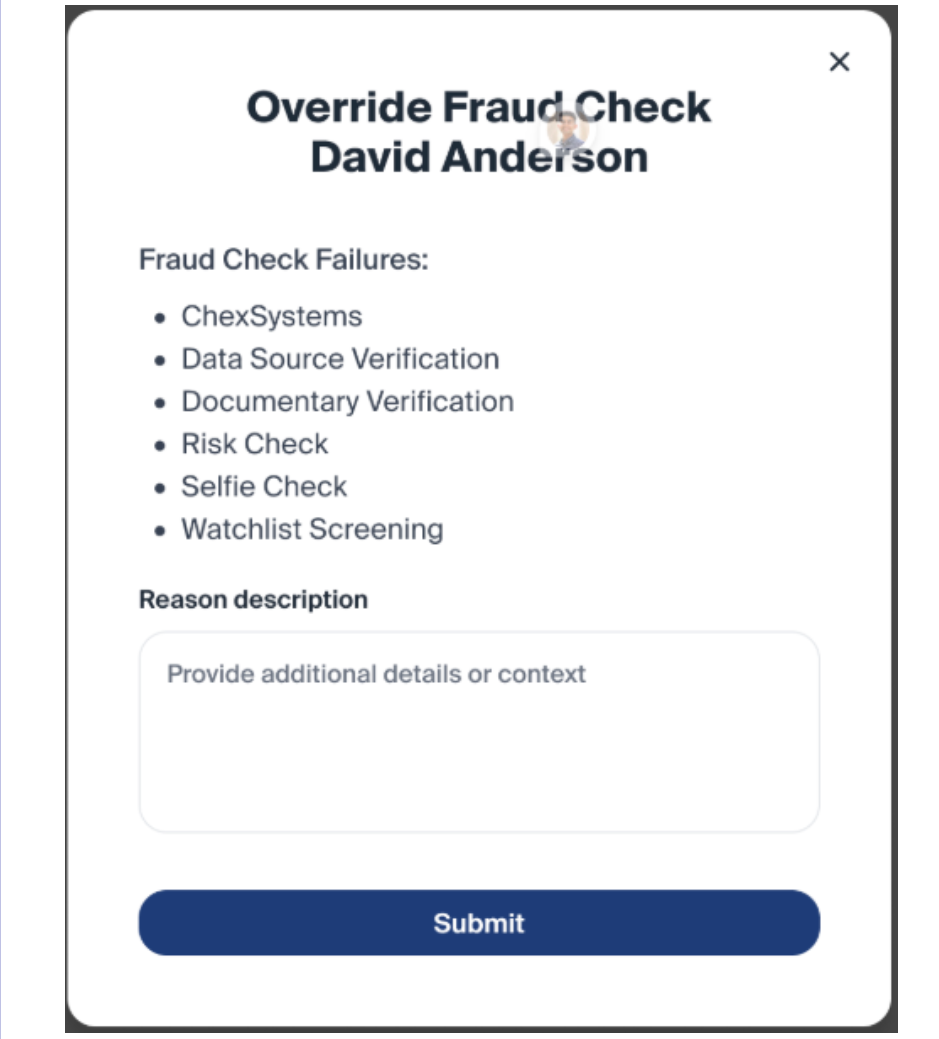
When It Appears
The pop-up will display if an applicant’s fraud status is not “Cleared” or “Pass” for any of the following checks:
ChexSystems
Data Source Verification
Documentary Verification
Risk Check
Selfie Check
Watchlist Screening
This applies to:
All applicants on an application (Primary Owner, any Joints, any Beneficiaries)
All membership types
Existing approved memberships when attempting to add new roles
Required Staff Action
When the pop-up appears:
Staff will see the failed check(s) listed.
A reason description must be entered before proceeding.
This field cannot be left blank.
The reason should provide context on why the override is justified.
Once submitted, the application or role will be approved, and the override will be recorded in the activity trail
Configuration Options
The Fraud Override Pop-Up can be configured to trigger in two ways:
All Fraud Check Failures – Displays the pop-up if any fraud check fails.
Watchlist Screening Only – Displays the pop-up only if the Watchlist Screening check fails.
Audit Trail & Reporting
Every override is automatically logged in the activity trail, showing:
Staff name and timestamp
Failed check(s)
Override description
Overrides are also included in the Fraud Override Report, which contains:
Employee Name
Employee Email
Fraud Check Failures
Fraud Override Description
Override Date
Why It Matters
This feature ensures that:
Fraud checks are not bypassed without review
Staff can handle legitimate cases where applicants fail checks in error
All override actions are fully documented for compliance and oversight