Identity Verification Procedures
Last updated: September 23, 2026
Overview
Through Glide’s fraud partner, Plaid Identity Verification (Plaid IDV), we’re able to safely approve the majority of applications. However, there are situations where an applicant gets placed into the “Pending” queue (manual review) after application submission due to failing one or more of the Plaid IDV steps. This guide will explain what causes an applicant to fail Plaid IDV, and what resolution steps staff members should take on the application.
For more information on these checks (Identity Check, Risk Check, Watchlist Screening), please see our Fraud Overview guide.
Plaid IDV Cases
Below are the scenarios in which an applicant can fail Plaid IDV, and what Glide recommends the staff member do to for each scenario.
Please note: Sometimes, an applicant can “Fail” a check even though they are a legitimate individual. Please review the application carefully to check for typos or unintentional mistakes. These applicants might not need to go through the step-up or retry process.
If you are in person with the applicant, selfie check does not need to be run as long as the person matches the photo identification provided.
Applicant Fails “Data Source Verification” Check
Plaid IDV conducts an identity check on the applicant by comparing their PII with authoritative data sources (see Fraud Prevention Overview for more info).
Resolution Path
Situation | Action | Details |
Name - No Match | If minor typo, correct manually. Otherwise, issue Data Source Verification and Selfie Check. | If significant mismatch with drivers license, issue a Data Source Verification and Selfie Check retry. Communicate to the applicant that they must use their government name listed on their ID document. |
DOB - No Match | If minor typo, correct manually. Otherwise, issue selfie check. | If mismatch with ID document, issue selfie check. If selfie comes back approved, edit the applicant DOB within Glide to match ID document. |
Address - No Match | If address matches ID, ignore. Request proof of address. | If address matches ID, no further action is needed. If mismatch with drivers license, request proof of address. |
Address is PO box or Commercial | Request a physical address from the applicant with proof of address. | Request a physical address from the applicant with proof of address. |
SSN - No Match | Request SSN Card and Selfie Check. | If SSN is not found, request SSN Card and Selfie Check. Plaid is not able to scan SSN cards. Please have the applicant attach this in an email/support ticket when you reach out. |
Applicant Fails Document Verification
Plaid checks that the information on an applicant’s document matches their PII, screens fake IDs, and ensures the document is readable.
Resolution Path
If documentary verification has failed all three times, request a retry for Documentary Verification from the applicant and inform them what to keep in mind while taking a photo of their document.
Failed Category | Meaning | Resolution |
Name Comparison | The submitted name is not a match to the data we extracted from the document. | - If significant mismatch with drivers license, then issue Data Source Verification and selfie check to verify the name. Communicate to the applicant that they must use their government name listed on their ID document. |
DOB Comparison | The applicant submitted a date of birth that does not match the data we extracted from the document. | - If mismatch with ID document, then issue selfie check. |
ID Type Comparison | The document type that we extracted does not match the document type the applicant selected during the verification process. | If your financial institution does not accept the ID type that was submitted, request an ID document from the applicant with the preferred type. |
Country Comparison | The issuing country of the document does not match the country the applicant resides in. | If your financial institution does not accept the country of the ID document that was submitted, request an ID document from the applicant with the preferred country. |
Portrait Presence | The submitted document does not contain a portrait | Request a retry for Documentary Verification and let the applicant know to submit a document with a portrait |
Portrait Details | Portrait Details does not appear authentic. | Request a retry for Documentary Verification and let the applicant know to submit a document with a portrait |
Image Composition | Image composition does not appear authentic. | Request a retry for Documentary Verification and let the applicant know they must take a photo of a document. They are not allowed to upload a photo of an ID or take a picture of a picture. |
Integrity Check | Document not not appear intact. The pictured document seems to damaged. | Request a retry for Documentary Verification and let the applicant know they must take a photo of a document. They are not allowed to upload a photo of an ID or take a picture of a picture. |
Detail Check | We check each document's details to ensure they match the jurisdiction's template. For example, field alignment, coloration, and identifying symbols. | Request a retry for Documentary Verification and let the applicant know they must take a photo of a document. They are not allowed to upload a photo of an ID or take a picture of a picture. |
Expiration | This document was expired at the time of verification. | Request a retry for Documentary Verification and let the applicant know to take a picture of an active ID document that is not expired. |
Issue Date | Issue date was not successfully extracted. | Request a retry for Documentary Verification and let the applicant know to take a clear photo of the ID. |
Applicant fails Risk Check
In addition to Data Source Verification/Document Verification checks, Glide also applies a Risk check to applicants (see Fraud Overview for details on this check).
Resolution Path
Risk Check | Risk Level | Checks to Request |
Email Risk | High | ID Document (unless previously captured), Selfie Check |
Phone Risk | High | ID Document (unless previously captured), Selfie Check |
Behavior Risk | High | ID Document (unless previously captured), Selfie Check |
Device Risk | High | ID Document (unless previously captured), Selfie Check |
IDV Network Risk | High | ID Document (unless previously captured), Selfie Check |
Synthetic Identity Risk | Medium or High | Second Document (SSN card), Selfie Check |
Stolen Identity Risk | Medium or High | Second Document (any ID), Selfie Check |
3 or more Risk checks | Medium or High | ID Document (unless previously captured), Selfie Check |
Stolen Identity Risk and Synthetic Identity Risk should be treated with higher severity. If these checks are returned as high, it is not recommended to approve the application.
Applicant fails Watchlist Screening
Glide checks applicants against a number of domestic and international watchlists, including OFAC.
Resolution Path
If an applicant fails Watchlist screening check, staff members should leave a note in the “Notes” section.
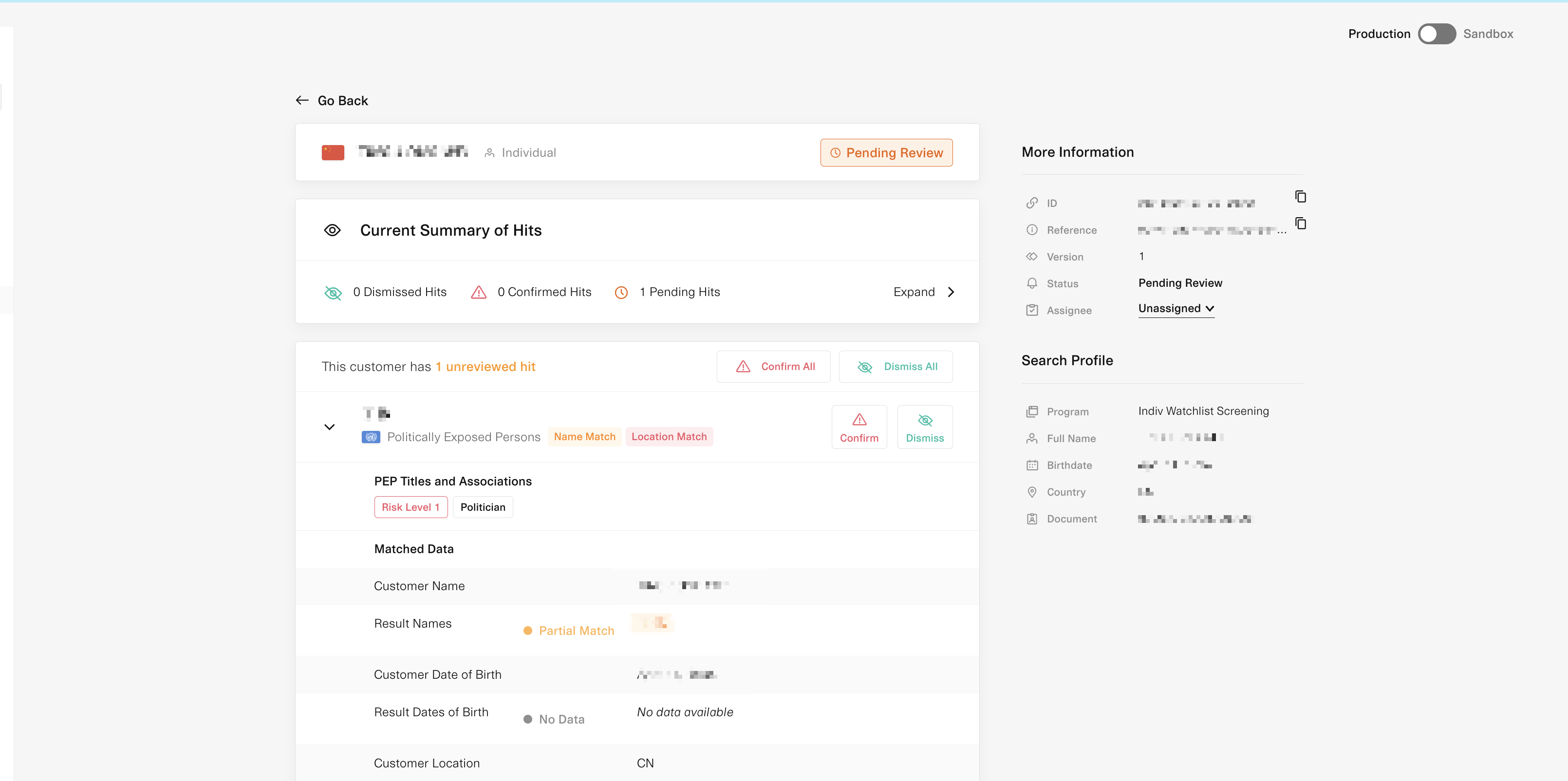
From here, the staff member should follow their organizations policy on OFAC to determine whether to accept or reject the applicant. To confirm or dismiss a screening, use the following steps:
Click on the “Resolve in Screening” button.
You’ll be taken to the Plaid Monitor view. On this page, you can analyze the hit deeper and confirm or dismiss the hit. Plaid will state what attributes of the applicant matched with a hit and the list that the applicant was found on.
Applicant Fails Multiple Checks
If the applicant fails more than one of the above check, this is a higher risk applicant. For these scenarios, we want to utilize the rest of this guide to find the total additional checks we need to run.
Resolution Path
Make a list of the steps the applicant failed. Review the rest of this guide to find all the additional checks that are recommended for each of the failures. Create a retry that combines all of the additional checks and send to applicant.
How to Request a Retry
To learn how to request an IDV retry via Plaid, see the following article: