Trustgrid Deployment Guide for Financial Institutions
Last updated: December 11, 2025
Trustgrid Deployment Guide for Financial Institutions
This guide is designed to help financial institution staff understand how to deploy Trustgrid network nodes, configure connectivity, and ensure high availability in your environment.
Step 1: Choose Your Appliance Type
Trustgrid nodes can be deployed as either virtual or hardware appliances. Your choice depends on how your organization manages IT infrastructure.
Virtual Appliance
Staff Responsibility:
Coordinate with IT/DevOps to deploy the virtual appliance in an existing VMware vSphere environment.
No physical hardware setup is needed.
Ideal For:
Institutions that prefer cloud or virtualized deployments.
Hardware Appliance
Staff Responsibility:
Work with IT to physically connect the device to your network.
Ensure the appliance is placed in a secure, monitored location.
Ideal For:
Institutions that require a dedicated, plug-and-play network device.
Step 2: Ensure High Availability
High availability ensures that your network stays operational even if one node fails.
High-Availability (HA) Clusters
Staff Responsibility:
Request IT to deploy nodes in a High-Availability configuration.
Ensure cluster IP addresses and firewall settings are configured.
Benefit:
Automatic fail-over protects critical network services.
Disaster Recovery
Staff Responsibility:
Work with IT to determine if additional disaster recovery configurations are needed.
Understand that DR may incur additional costs.
Step 3: Determine Network Configuration
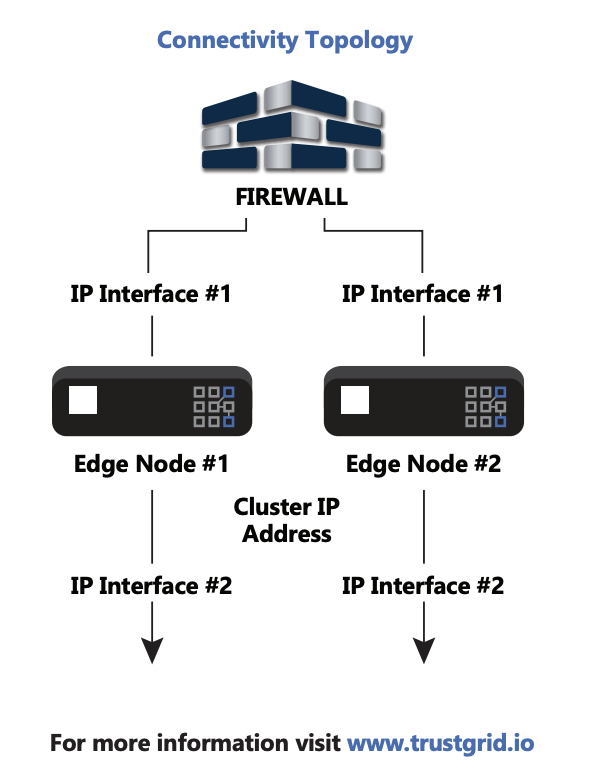
Trustgrid nodes can have one or two network interfaces depending on your firewall and IP setup.
One Interface
Used when the node sits entirely behind a firewall.
Staff Action:
Confirm firewall allows node communication.
Ensure the IP address is properly assigned by IT.
Two Interfaces
Used when the node needs to connect to both internal (LAN) and external (WAN/DMZ) networks.
Staff Action:
Confirm which interface will connect to which network.
Ensure firewall rules allow proper traffic flow.
Recommended for complex setups or when separate networks are required.
Step 4: Interface Selection Guidelines
When coordinating with IT, confirm:
Number of interfaces needed
One for simple behind-firewall setups.
Two for WAN/LAN or DMZ/LAN setups.
IP Address Assignment
Public vs. private IP addresses.
Firewall Placement
Ensure firewall rules allow Trustgrid traffic.
Step 5: Connectivity Examples
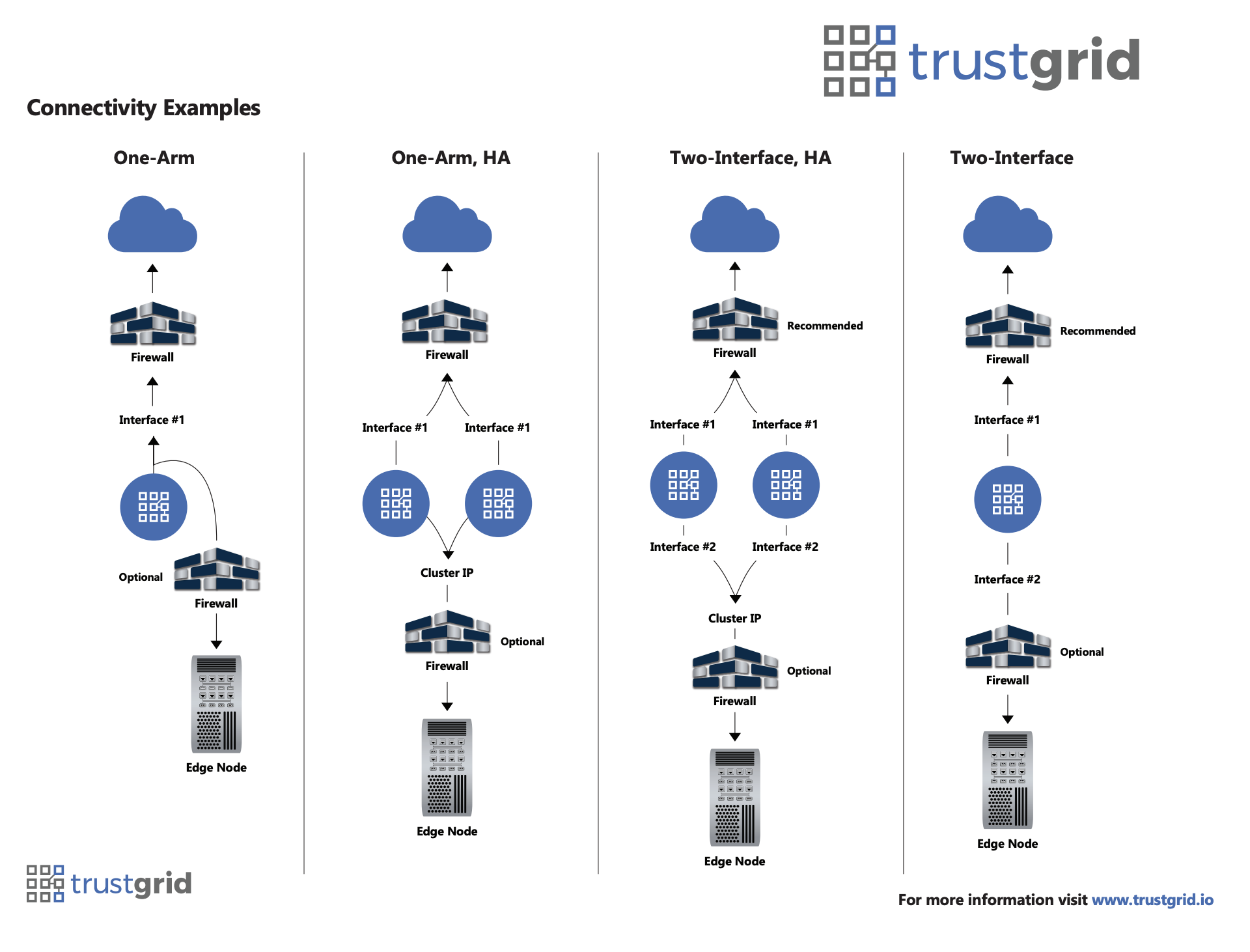
One‑Arm (Single‑Interface): A simple deployment where all traffic flows through a single network interface.
One‑Arm HA (Single‑Interface High Availability): Provides the same single-interface setup with high availability for continuous connectivity.
Two‑Interface (Dual‑Interface): Uses separate interfaces to segment internal and external network traffic for improved security.
Two‑Interface HA (Dual‑Interface High Availability): Combines dual-interface segmentation with high availability to ensure uninterrupted and secure connectivity.
Step 6: Verify Connectivity
After deployment:
Staff Action:
Confirm the node is visible on the network.
Test access to required internal systems.
Notify IT of any connectivity issues.
Step 7: Support and Resources
For further guidance:
Please contact our DPM team for any questions. You can also visit Trustgrid’s official website: www.trustgrid.io
Work closely with IT or network teams for configuration, monitoring, and troubleshooting.
Document deployed appliances, IP addresses, and interface assignments for future reference.