How Glide protects account opening from bots and fraud
Last updated: November 18, 2026
Glide protects account opening with advanced bot detection built to uncover automation designed to look human. It combines checks on the authenticity of the browser and device with analysis of how the application is used, helping detect altered browsers, simulated devices, and scripted behavior that attackers use to disguise themselves. These checks run in the background without asking applicants to solve CAPTCHA puzzles.
Glide verifies the result on its own servers before paid identity-verification, bank-linking, and fraud-check services are called. Combined with verification-code limits, safeguards for legitimate applicants, identity verification, and ongoing monitoring, this creates five layers of protection against automated abuse and fraud. Bot detection and blocking come standard for every Glide customer.
The five layers of protection
1. Bot detection on every application
Glide uses bot-detection technology built around more than 350 signals to uncover automation, including tools designed to disguise themselves as real applicants. Checks begin when the application opens and incorporate interaction patterns as the applicant uses the page.
The checks look at:
Browser and device authenticity: Whether the browser’s hardware and software details are consistent with the device it claims to be. This helps expose modified browsers, simulated devices, and tools designed to hide automation.
Real versus software-generated input: Whether clicks, keystrokes, and touch events come from ordinary user interaction or are injected or replayed by software.
Behavior and timing: How the pointer moves, the rhythm of typing, touchscreen interactions, and the timing of form completion. These can reveal unusually rigid, repetitive, or machine-speed patterns.
Independent cross-checks: Whether the browser’s claims match connection details observed by the detection service. For example, a session may claim to be a mobile browser while other signals point to a different environment.
The bot detector observes how fields are used, such as typing or pasting, without collecting the values entered into them.
Glide verifies the result on its own servers before identity verification, bank linking, or fraud checks begin. For online applications, requests are stopped when the result indicates high-risk automation, is missing or has been altered, or has been reused too many times.
This means a bot cannot bypass the protection by changing the application page or skipping the browser check. A blocked request stops before it triggers those paid services.
2. Capped text-message verification codes
Glide limits code requests at several levels: the phone number, the internet address making the request, and the institution as a whole. For example, a phone number can receive one code every 30 seconds and up to five codes in 10 minutes.
Glide also rejects expired or excessively reused bot-check results and caps requests that arrive without a result. Messaging-provider protections screen for high-risk destinations. Together, these controls contain attacks designed to generate large volumes of text messages.
Sign-in and phone-verification codes are not blocked solely because of a bot risk score. This helps legitimate applicants continue when tools such as autofill or virtual desktops produce signals that resemble automation.
3. Safeguards that keep legitimate applicants moving
The protections account for how people actually use the application:
Slower devices: If the bot check is still finishing, Glide can wait up to eight seconds for it to complete before continuing to a protected step.
Ad blockers and network filters: The check loads through your institution’s own website domain, helping prevent tools that block third-party services from interrupting it.
In-branch applications: Staff-assisted identity verification does not reject an applicant based on the bot score alone. Checks for valid results and excessive reuse still apply.
These safeguards work alongside monitoring for legitimate applicants who are having trouble continuing.
4. Identity verification as another gate against fraud
A real person attempting fraud can pass a bot check. Identity verification addresses that separate risk.
For institutions using Plaid Identity Verification, applicants must verify access to their phone, have their personal information checked against trusted data sources, and pass the applicable risk checks. These checks help identify stolen or fabricated identities and coordinated fraud attempts.
Available bot and fraud-ring indicators are retained with the verification session, and your institution’s fraud controls remain part of the protection.
5. Monitoring across every layer
Glide monitors for patterns that need investigation, including:
Sudden increases in application starts or blocked requests.
Suspected bots reaching identity verification.
Signs that legitimate applicants are being blocked.
Verification-code requests arriving without a bot-check result.
Alerts help Glide investigate attacks, identify problems affecting real applicants, and respond as patterns change.
Where the checks happen
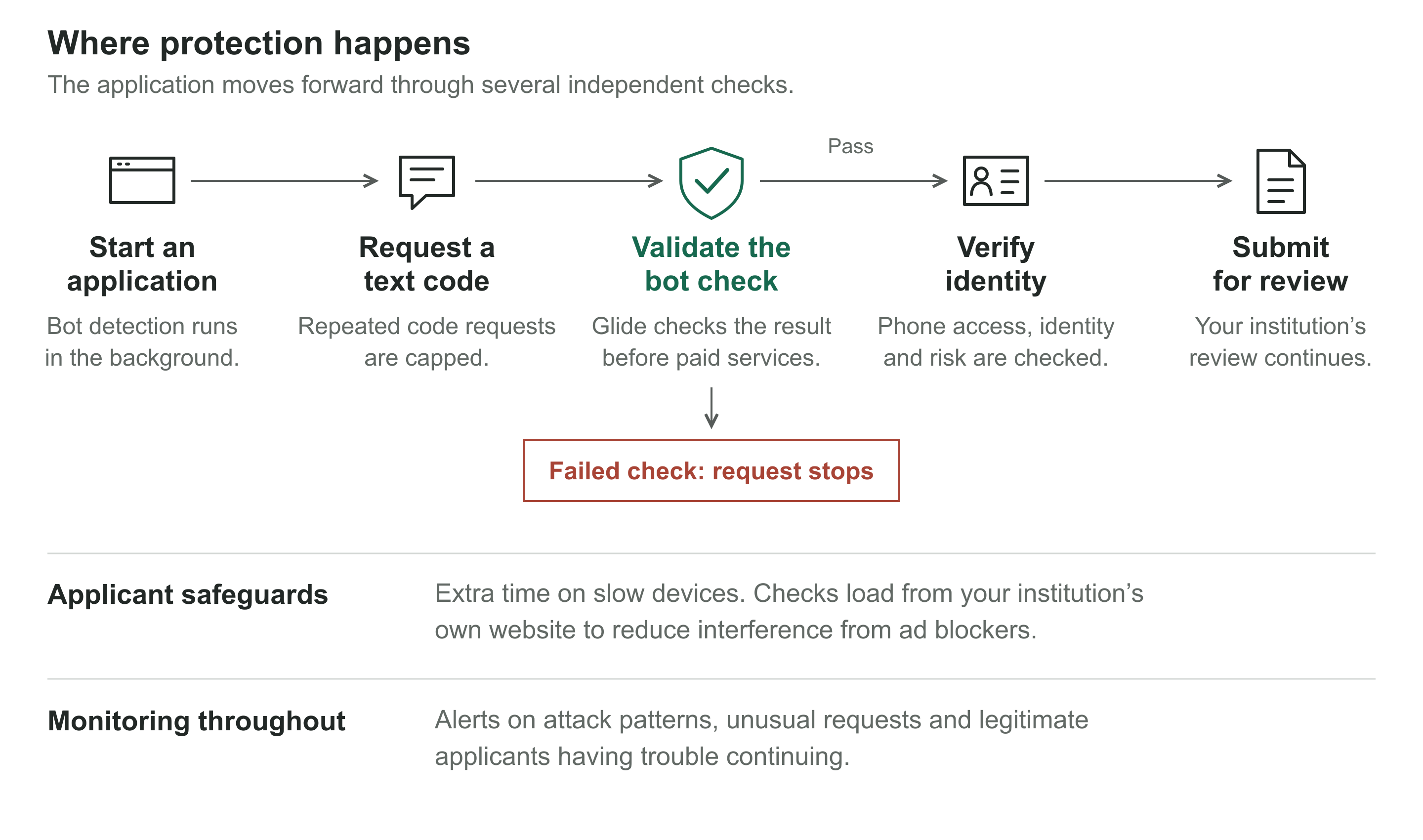
The bot check starts when the application opens. Code requests have their own limits, and Glide validates the bot-check result before protected paid services are called. Applicant safeguards and monitoring operate across the flow.
Frequently asked questions
Can a bot skip the check or change the application page?
No. Glide validates the bot-check result on its servers before protected verification services are called. Changing the page does not remove that requirement. Code requests that arrive without a result are also capped.
Why not block verification texts whenever the bot score is high?
Everyday tools such as autofill and virtual desktops can sometimes resemble automation. Using the score alone could prevent legitimate applicants from signing in. Glide protects verification texts with request limits, checks against excessive reuse, and messaging-provider safeguards.
Does this slow down account opening?
No, the bot check runs in the background while the applicant uses the page. Before a protected step, Glide waits for the result if it is not ready yet and even on the slowest od devices or internet connections, this adds only a few seconds of wait.
What about applicants using ad blockers or VPNs?
The bot check loads through your institution’s own website domain to reduce interference from ad blockers and network filters. A VPN by itself does not cause Glide’s bot protection to block an applicant.
Can these protections stop fraud carried out by a real person?
Bot detection identifies automation. Identity verification adds checks on phone access, personal information, and fraud risk to help catch people using stolen or fabricated identities. Limits on repeated attempts and your institution’s review process provide additional protection.
What should we do if a legitimate applicant is blocked?
They may see: “Unable to verify your request. Please refresh the page and try again.”
Ask them to refresh and retry. If the issue continues, contact Glide Support with the approximate time, the application step, and the message shown. Glide also monitors for signs that legitimate applicants are being blocked.
Does a blocked request trigger identity-verification fees?
When a request is blocked before a paid identity-verification session is created, that request does not trigger identity-verification fees.
Related reading
For more on applicant identity and fraud checks, see our Fraud Prevention Overview.
Read how Glide stopped a 282,000-session bot attack for an example of these protections in action.