Plaid Protect: Search Attributes and Create Custom Rule Groups
Last updated: October 13, 2026
Use Plaid Protect to investigate verification activity and create custom checks for your identity-verification workflow. This guide covers searching by attribute and configuring Rule Groups to reject a matching Plaid session or request additional verification.
Part 1 — Search by attribute in Plaid Protect
1. Open the attribute picker
Go to Protect → Overview and click Search by attribute…. Type a field name or browse the categories. Select the actual field from the results; typing its name alone does not add a filter.
For example, type user.pi.email and select the plain email field, rather than one of the email-risk fields underneath it.
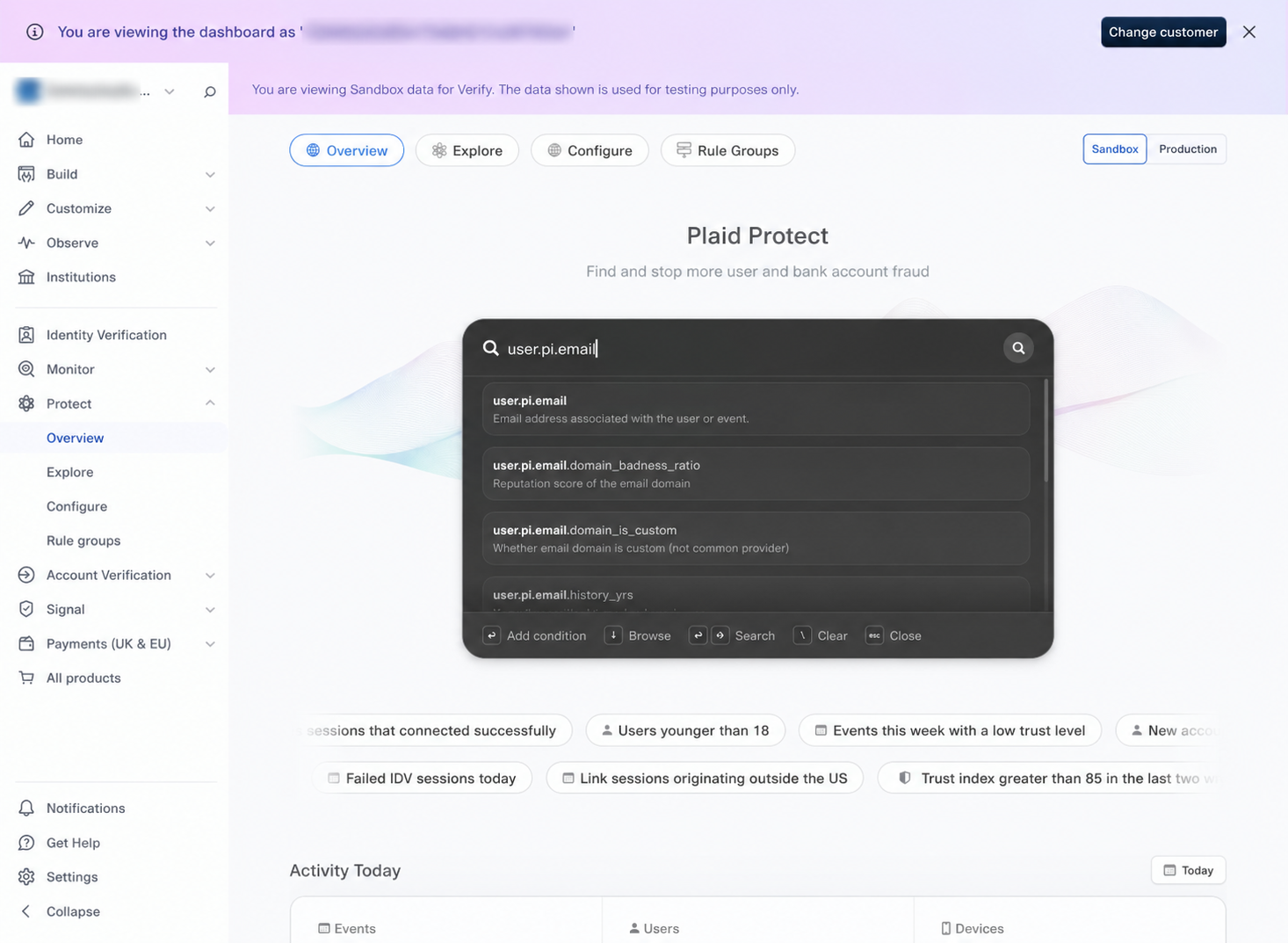
Search the field name, then select the matching attribute.
2. Choose an operator and enter a value
Select Equal to (==), enter glide-kb-block@example.com, and press Enter to add the condition. The completed condition should read:
IF user.pi.email == glide-kb-block@example.comThe email field offers In, Not in, Equal to, Not equal to, Exists, and Does not exist. Other fields offer operators appropriate to their data type. Use the picker’s supported operator and value format.
Additional conditions in the same expression are joined with AND: all must match. To match any of several values for a single field, use In where available. Do not add “email equals A” AND “email equals B”; one email cannot equal both.
3. Run the search and review the results
Click the magnifying-glass search control or press Shift + Enter. Plaid opens Explore with your filter applied.
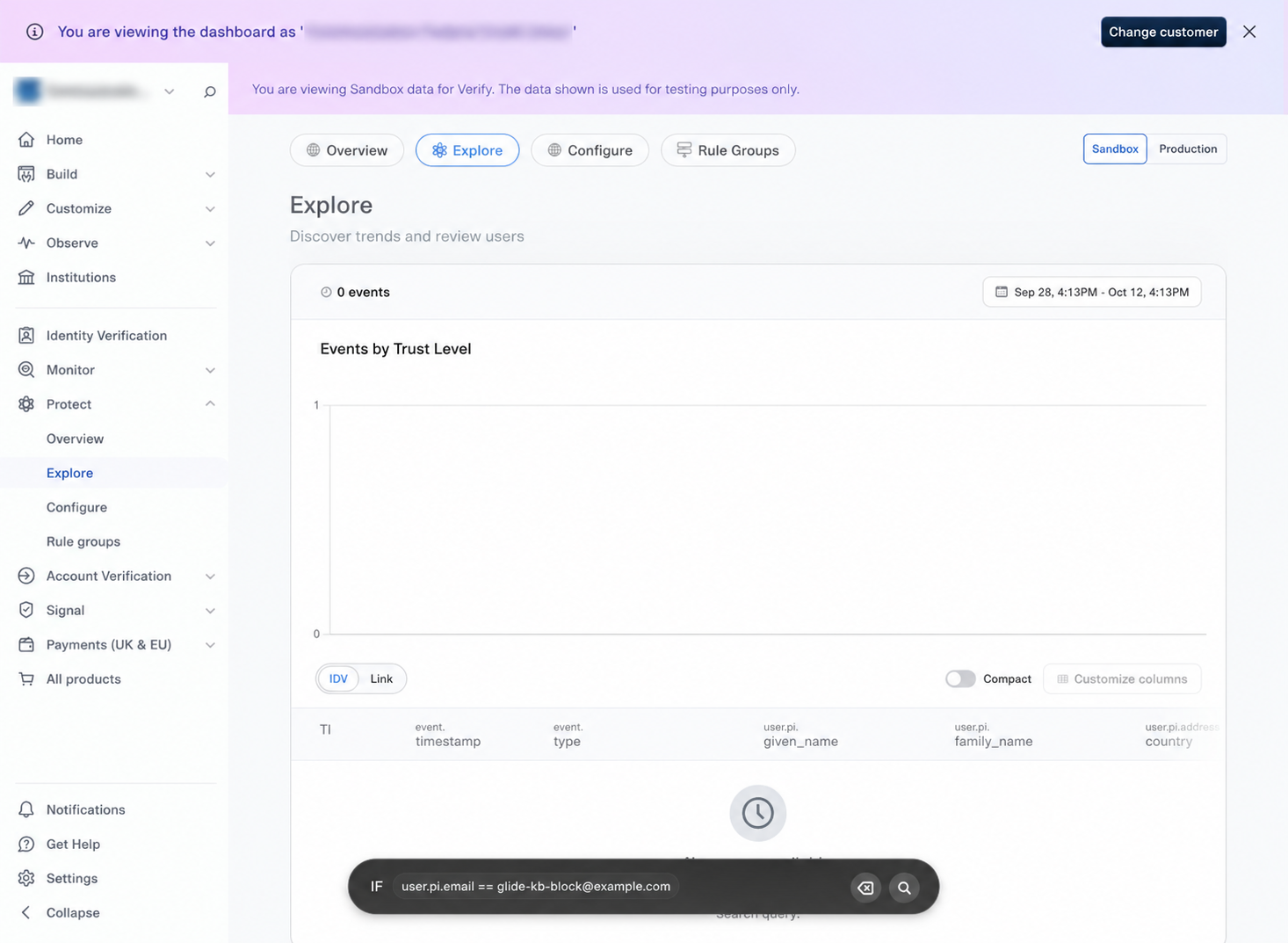
The synthetic email search returns zero events in this example.
Set the date range you want to investigate.
Select IDV for identity-verification events or Link for bank-linking events.
Use Customize columns, where enabled, to show the fields relevant to your investigation.
Open a matching event/session to examine its details and timeline. Confirm which fields actually have values before using them in a rule.
If there are no results, check the team, environment, date range, event type, spelling/value format, and whether Plaid collected that attribute. Results count events, not necessarily unique applicants or Glide applications.
Useful investigation patterns
Question | Useful fields | How to interpret it |
|---|---|---|
Has a known identifier appeared again? |
| Find related activity and check the full session. Shared devices, IPs, and recycled phone numbers can connect different people. |
Which sessions need closer risk review? |
| Combine risk signals with session evidence. Lower Trust Index means higher risk; a single signal is not an application decision. |
Where did verification stop? |
| Compare the overall session with individual step results. |
Part 2 — Create Rule Groups and choose rejection or escalation
1. Create and name the group
Go to Protect → Rule Groups → New rule group. Click the pencil next to the group name and give it a clear purpose. For a staging exercise, use a name such as TEST – Block example email.
2. Add and save the rule
Click Add new rule.
Select
user.pi.email, choose Equal to, and enterglide-kb-block@example.com.Press Enter to create the condition chip.
Click the Save rule icon at the upper-right of the attribute composer.
Click Create rule group in the group panel. When editing an existing group, use its save/apply control.
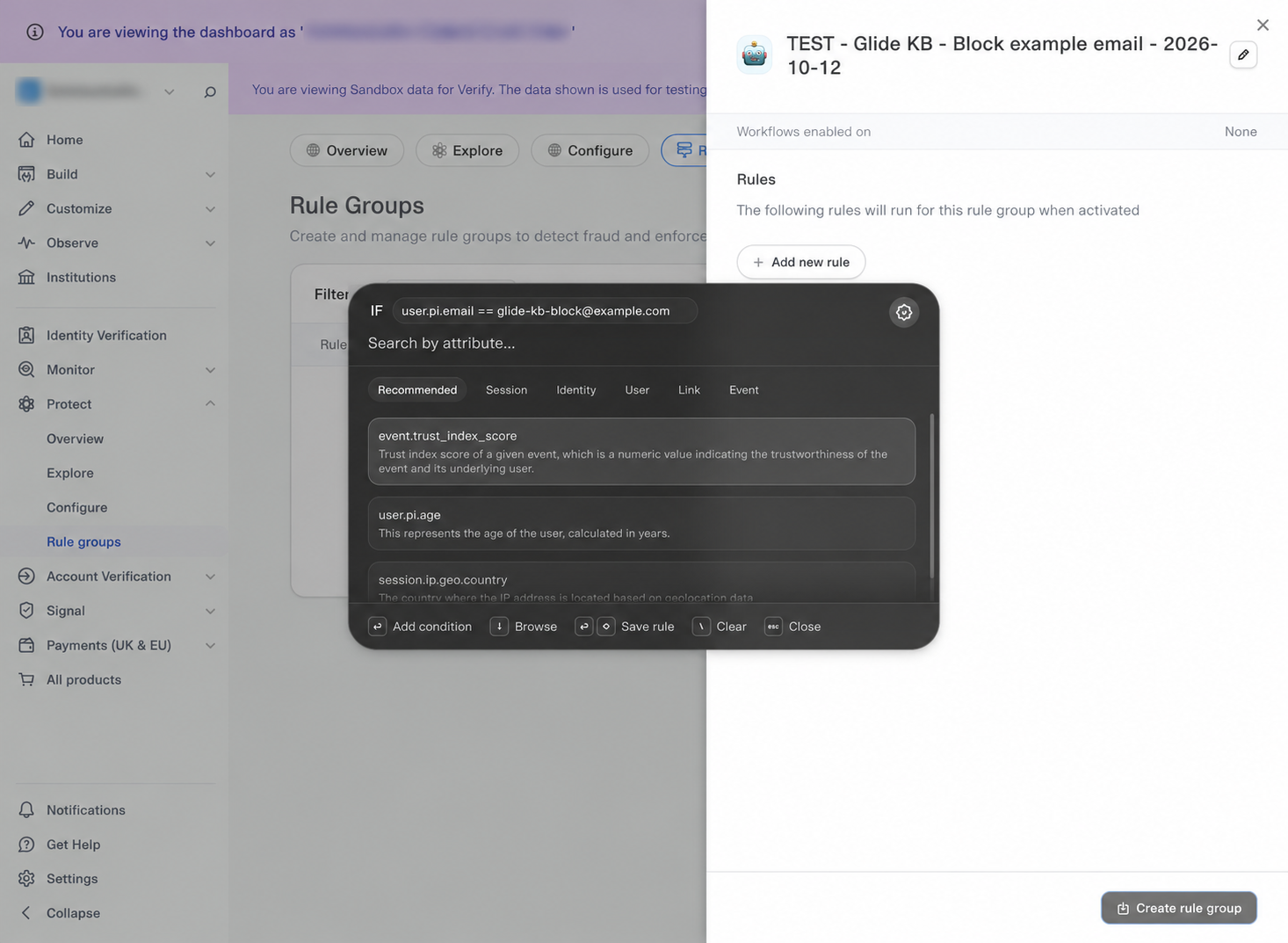
“Workflows enabled on: None” means the group is not attached to a workflow. Saving a group does not, by itself, reject any sessions.
Add multiple conditions and rules
Conditions within one rule use AND; separate rules within a group use OR. Keep conditions in the same rule when they must all be true. Use Add new rule when you want another way for the group to match.
Example A: age AND email
Open the rule group and click Add new rule.
Select
user.pi.age→ Equal to (==) → enter35→ press Enter.In the same attribute composer, click Search by attribute… again. Select
user.pi.email→ Equal to (==) → enterglide-kb-block@example.com→ press Enter.Confirm the two condition chips are joined by AND, then click the Save rule icon.
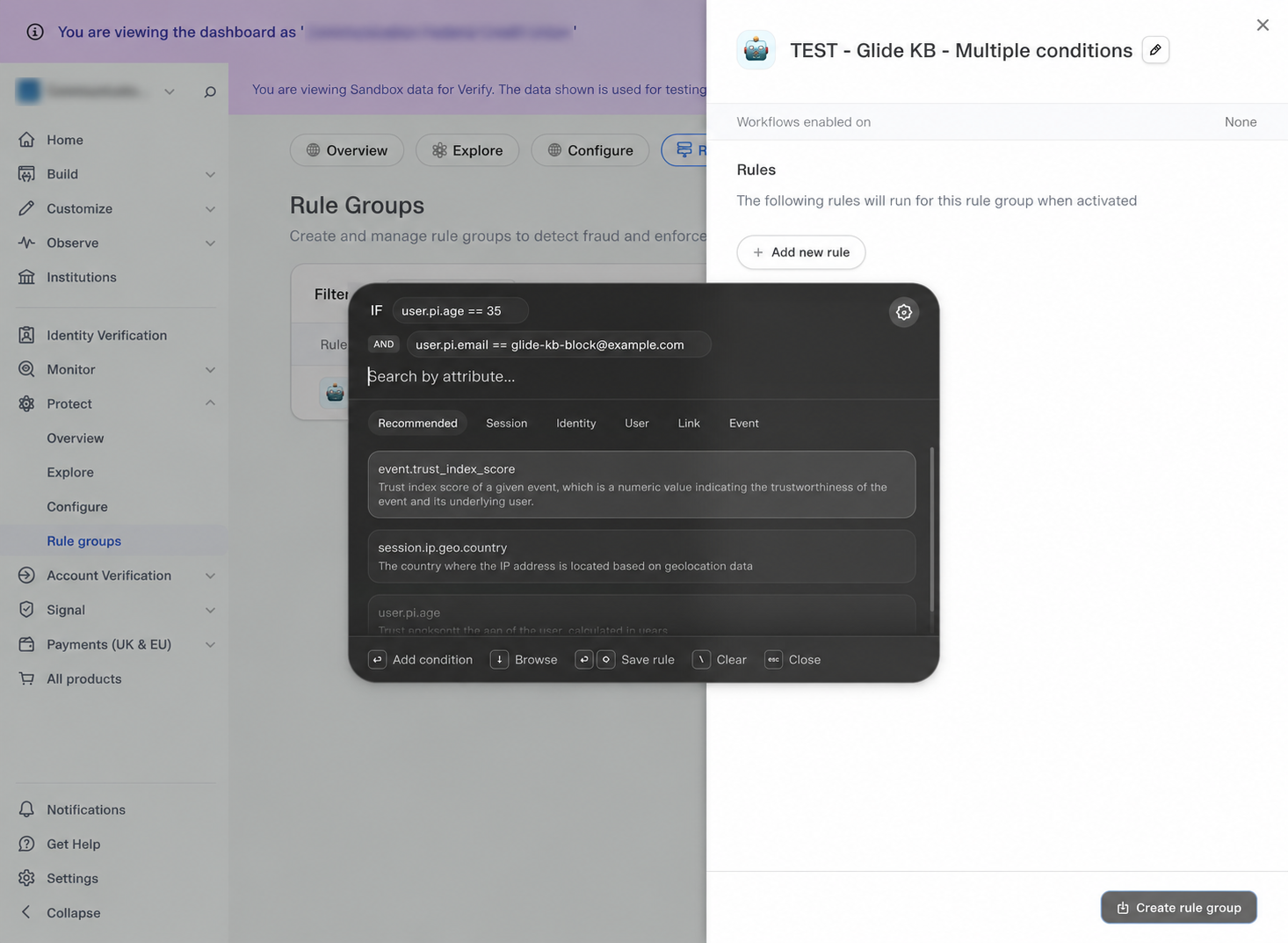
This rule matches only when age is 35 AND the email equals the synthetic example email. Age 35 alone does not match. These values demonstrate the controls; replace them with your intended conditions.
Example B: city AND state as an alternative rule
Back in the group panel, click Add new rule again.
Select
user.pi.address.city→ Equal to → enterSpringfield→ press Enter.In the same composer, add
user.pi.address.region→ Equal to → enterIL→ press Enter. Plaid calls the state field region; use the state/region format present in your session data.Save the rule. Confirm the group shows OR between the age/email rule and the city/state rule.
Click Create rule group, or the save/apply control when editing an existing group.
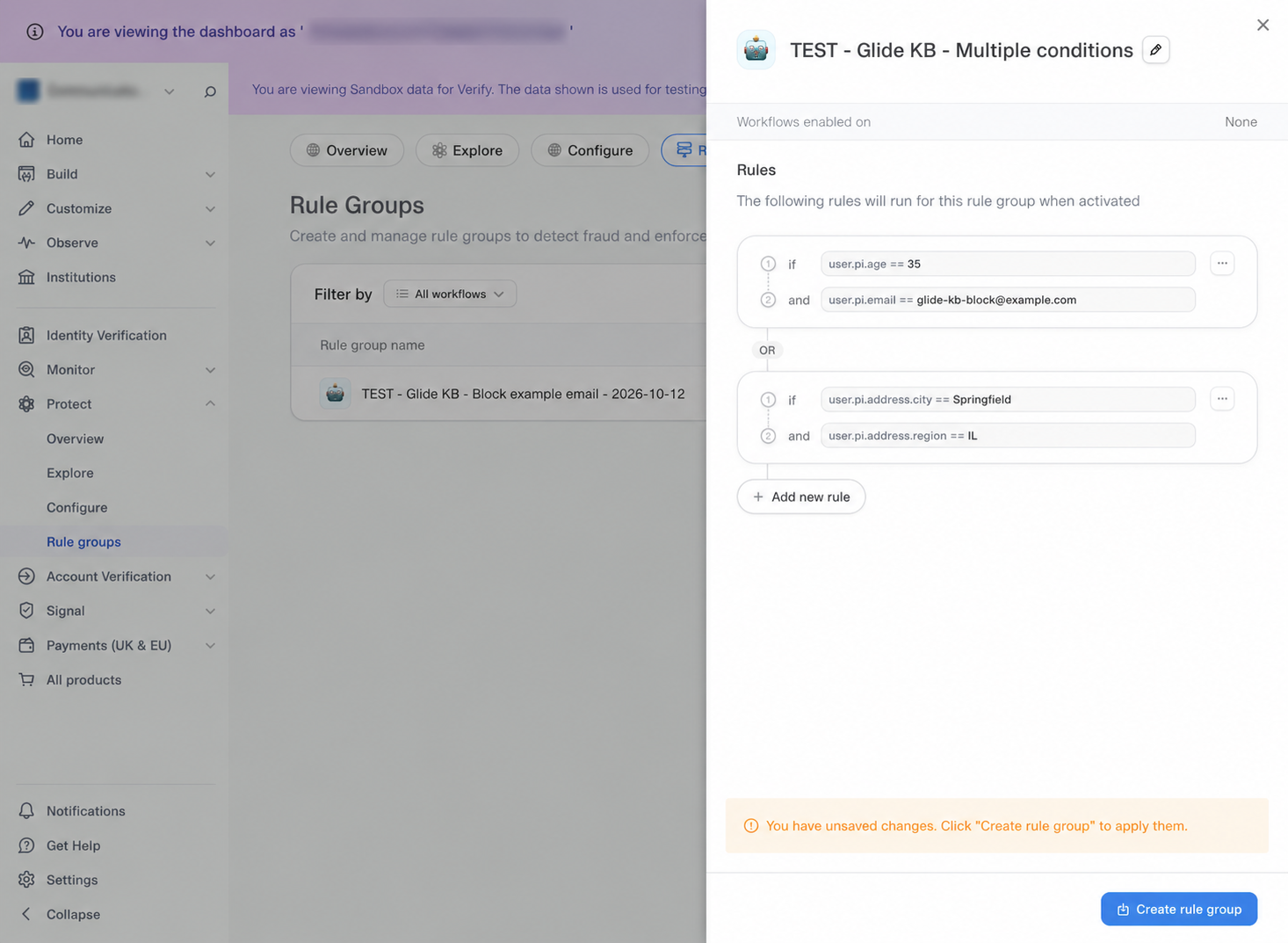
Two rules in one group: either complete pair can match.
(age == 35 AND email == glide-kb-block@example.com)
OR
(city == Springfield AND region == IL)
The group matches if the age/email pair is true, or the city/state pair is true. If you need all four conditions to be true, put all four in a single rule instead. For several acceptable values of one field, use In where available.
3. Choose rejection or escalation
Desired result | Where to configure it |
|---|---|
Reject a matching Plaid session | Risk engine → Rule group execution → Reject user → Active |
Request additional verification | Edit outcomes beneath Data source verification or Document verification → Use risk-based escalation → Rule groups |
Option A: reject the matching session
Open Protect → Configure and select the template used by the Glide flow you want to change.
Check the environment and the Global / country context. Confirm the rule applies in the country configuration used by that flow.
Open Risk engine → Rule group execution.
Click Add rule group and select your group.
For an enforced failure, confirm the outcome is Reject user and the mode is Active.
Close the panel and click Publish Changes to make the template change effective. An Unpublished changes banner means the draft is not yet live.
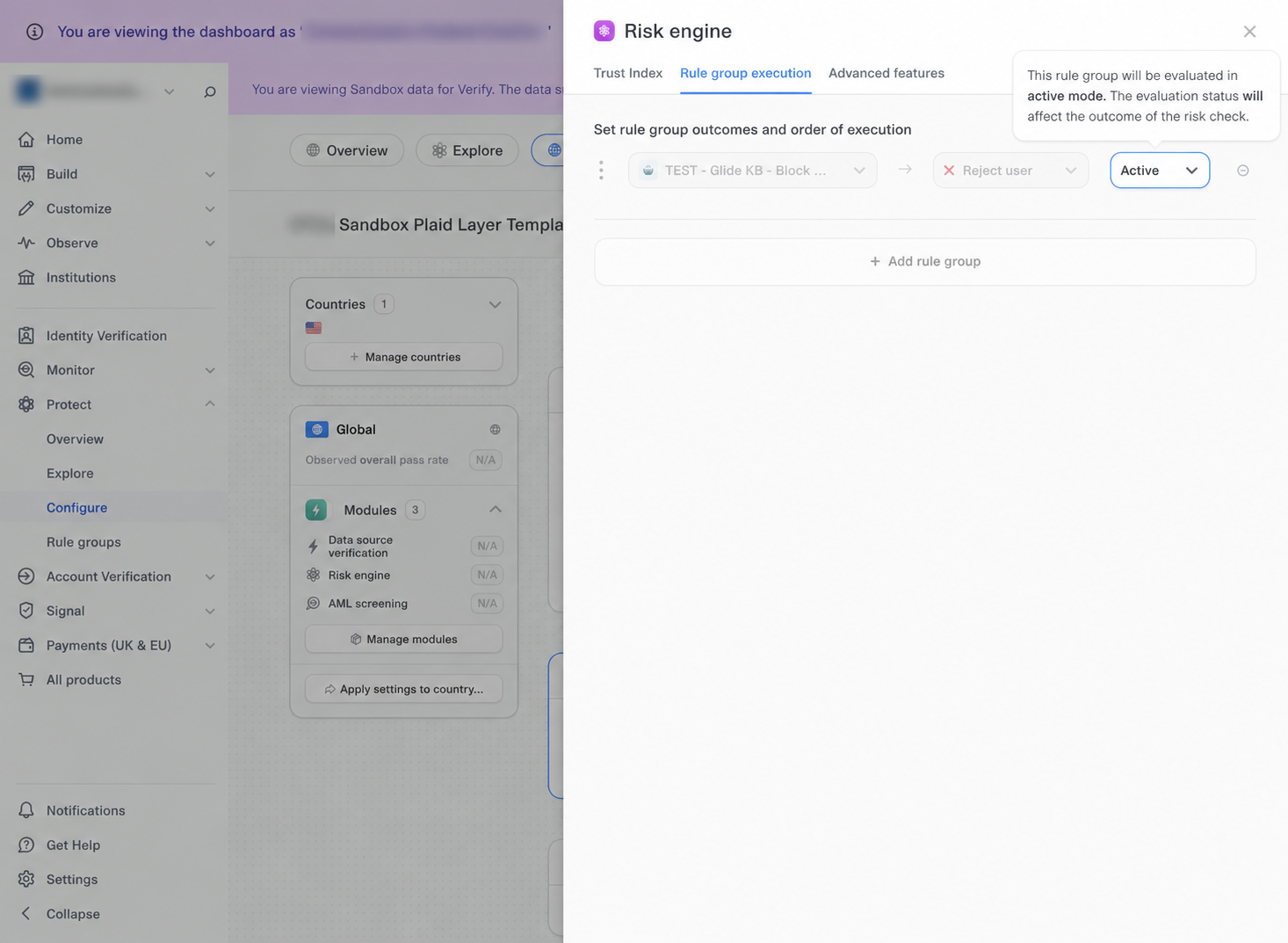
The enforcement configuration is Rule group execution → your group → Reject user → Active. The pictured setup was inspected as an unpublished Sandbox draft.
Setting | Required for this example |
|---|---|
Rule condition |
|
Workflow location | Risk engine → Rule group execution |
Group outcome | Reject user |
Execution mode | Active |
Scope and save state | Correct team, environment, template, and applicable country configuration; changes published |
When the condition matches in this configuration, the group is intended to reject the Plaid verification through the risk check. A nonmatching email only avoids this rule; the session can still fail another check.
Choose the right execution mode
Mode | Dashboard behavior |
|---|---|
Active | Evaluates the group and affects the risk-check outcome. |
Test | Evaluates the group without affecting the risk-check outcome. Use it to assess a rule before enforcement. |
Inactive | Does not evaluate the group during the risk check. |
Option B: escalate to another verification step
Use escalation when a match should request more verification. Configure it on the workflow’s passing-step path; the If this step fails, go to route is a separate setting.
In Protect → Configure, select the correct template and Global/country context. Use Manage modules to enable Document verification for escalation after Data source verification, and Liveness verification for escalation after Document verification. The corresponding Edit outcomes controls appear beneath those steps in the workflow.
After Data source verification:
Click Edit outcomes directly beneath the Data source verification block.
Under If this step passes, go to, turn on Use risk-based escalation.
Select Rule groups. If switching from Trust Index, Plaid asks you to confirm clearing the threshold.
Click Add rule group, open Select rule group…, and choose the saved group. Add other groups if needed; the first matching group triggers the escalation path.
Check then shows Document verification. Choose the else destination for a nonmatch. In this example, Risk engine continues the workflow without requesting document or liveness verification.
Review If this step fails, go to separately. The example sends a failed data-source check to Document verification.
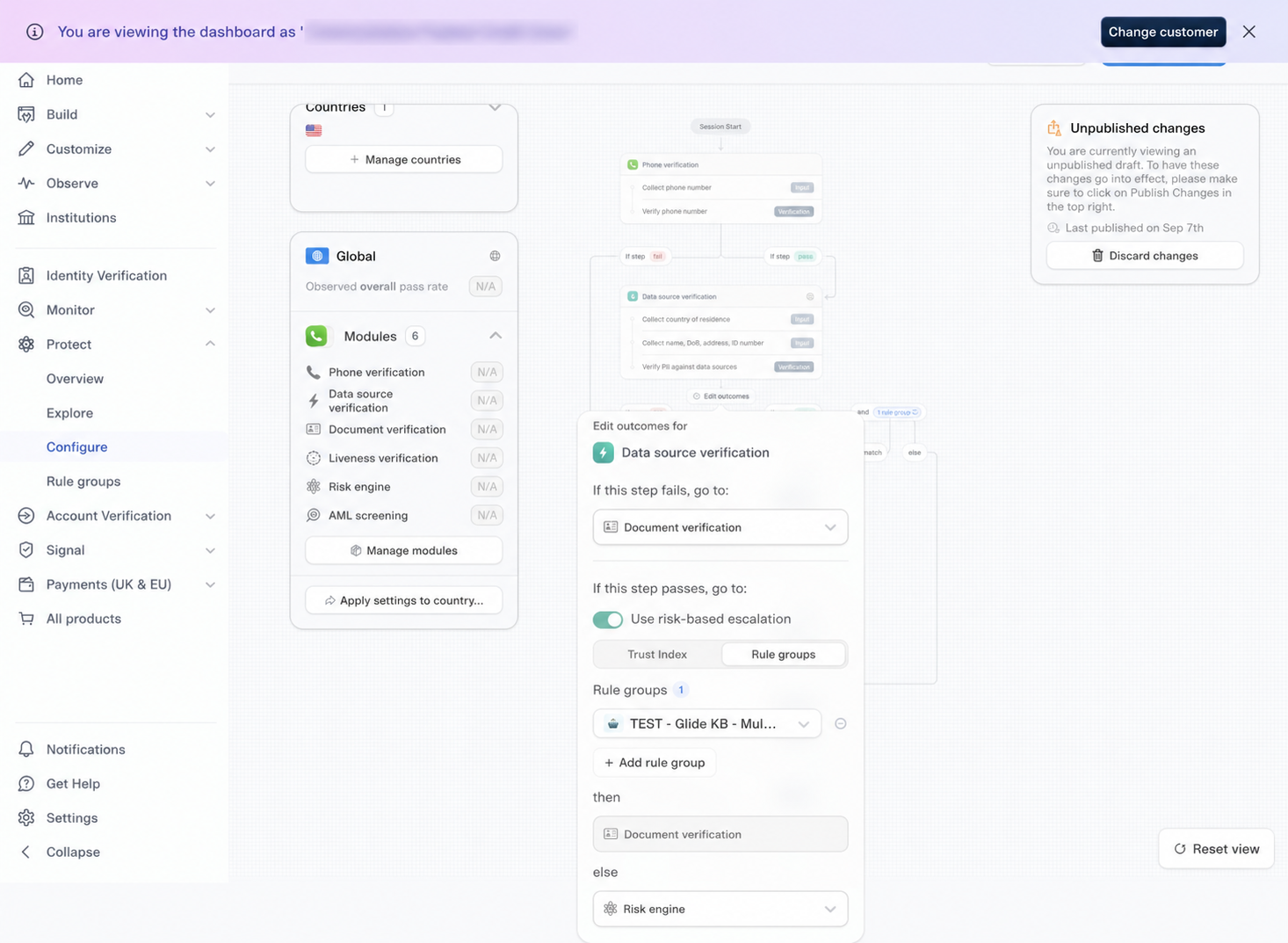
Passing data-source check + matching group → Document verification. Passing check + no group match → Risk engine. The failed-step route is configured separately at the top.
After Document verification:
Click outside the first editor, then click Edit outcomes beneath the Document verification block.
Turn on Use risk-based escalation and use Rule groups → Add rule group to select the group for this stage. The document-stage list is separate from the data-source list.
Confirm then → Liveness verification and review the else and failed-step routes. In the pictured configuration, both of those routes continue to Risk engine; they do not change a failed document result into a pass.
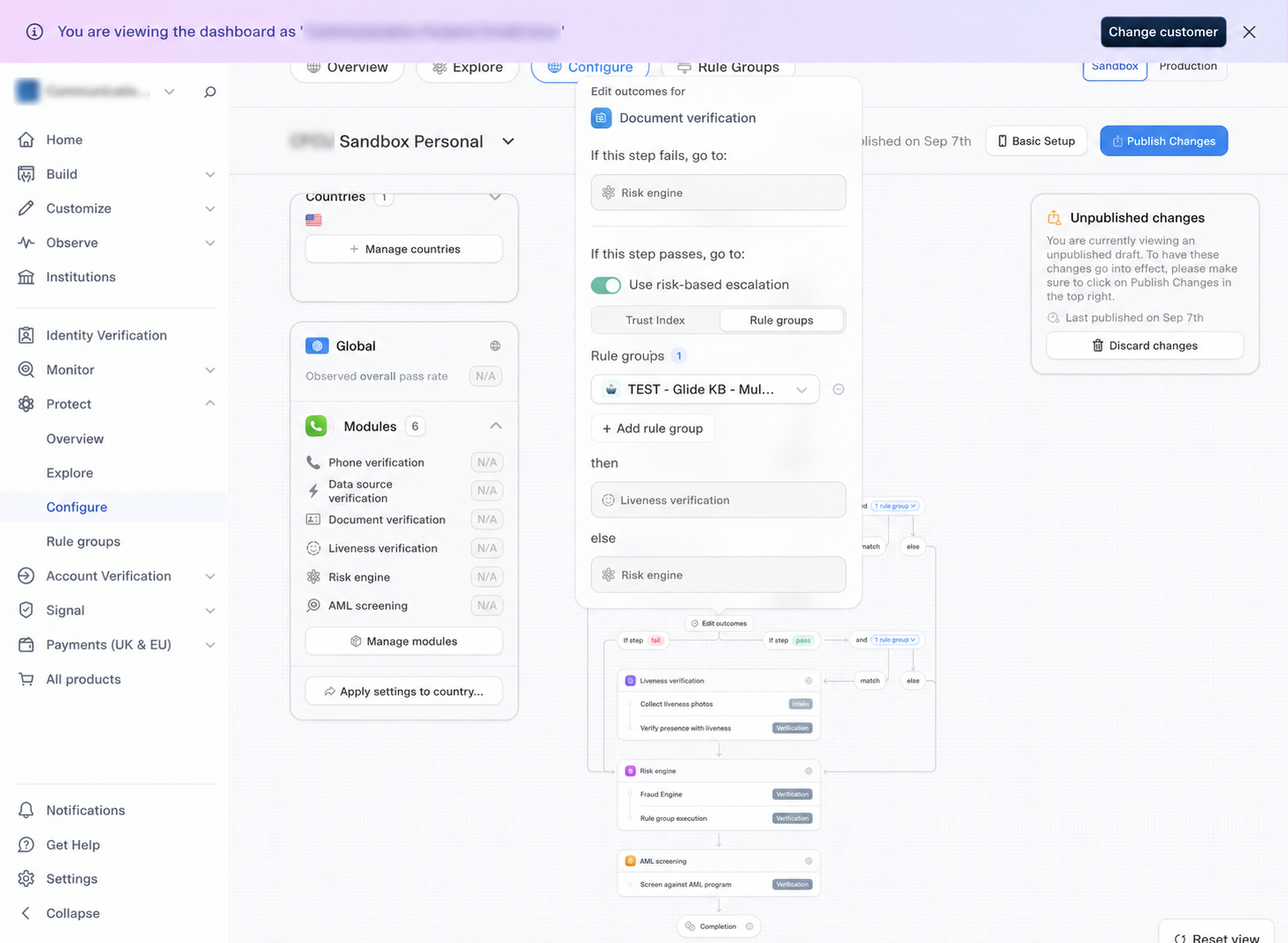
Passing document check + matching group → Liveness verification. No match continues to Risk engine.
Selecting Trust Index instead of Rule Groups:
In the same Edit outcomes editor, keep Use risk-based escalation on and select Trust Index.
Click the threshold chip, such as Trust Index ≤ 75, and adjust the slider. A score at or below the selected threshold takes the then path; other scores take else. The displayed 75 is an example, not a recommended cutoff.
Review the destinations and the escalation setup after both verification steps before saving.
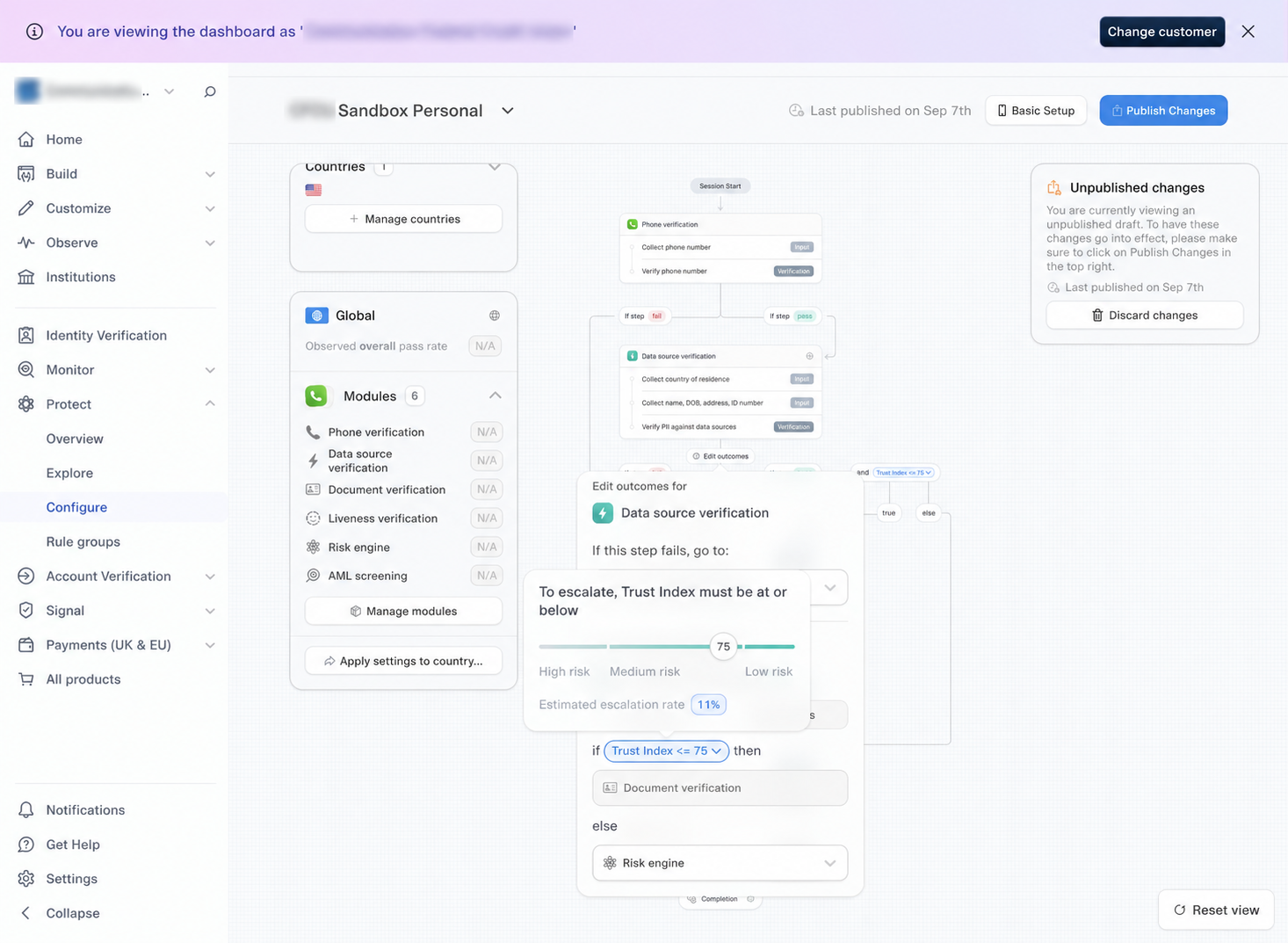
The threshold chip opens the slider. The workflow also shows the then and else routes.
Choose one escalation mechanism for the workflow. Trust Index and Rule Groups are alternatives, not simultaneous conditions. Changing the mechanism affects the workflow’s escalation mode; the group lists after Data source verification and Document verification are configured separately. Switching to Rule Groups clears the Trust Index setting; switching back removes the configured escalation groups. Review both stages, fill any empty required group lists, and resolve validation errors before publishing. Removing a group from an escalation list does not delete the saved Rule Group itself.
Click outside the editor, review the complete workflow, and click Publish Changes when the configuration is ready. Test matching and nonmatching cases in staging for each enabled escalation stage.
Using escalation and rejection together: You can configure an escalation path and a separate Risk engine → Rule group execution rejection rule in the same workflow. Keep their purposes clear: completing the extra verification does not disable an Active + Reject user rule that also matches later. If you only want additional verification, attach the group in the escalation editor rather than also making it an active rejection rule. Active / Test / Inactive are Risk engine execution modes; do not assume Test mode there disables an independently configured escalation path.
4. Validate in staging before enforcing
Search historical events with the intended conditions to review what would match.
Use Test mode to observe evaluation without changing risk-check outcomes.
In the approved staging/Sandbox flow, run one new session with the synthetic matching email and one with a different email. Confirm the correct template was used.
For an enforcement test, use Active + Reject user, publish the Sandbox change, and inspect the overall session and rule outcome in Plaid. Check that the different-email session does not match this rule; other checks may still fail.
Open the corresponding Glide application and check its status and verification rows separately. Remove or deactivate the temporary test configuration when finished.
Use Plaid’s supported Sandbox identities or Sample Identities. Sandbox does not reproduce every live check—for example, selfie verification does not run there—and repeated testing can affect network/device risk signals. See Plaid’s testing guide.
What will appear in Glide after Plaid fails?
Standard checks: Glide displays results such as Data Source Verification, Risk Check, Document Verification, Selfie Check, and Watchlist Screening when those results are available.
Limited failure detail: Glide may show a failed Risk Check or a general reason such as “Risk Check failed.” or “Fraud checks require manual review.” It does not currently show a dedicated custom-rule result with the group name, exact condition, or matched value.
Investigate in Plaid: Use Open IDV in Plaid from Glide’s verification area and inspect the relevant session. Passing individual KYC/document checks does not establish that the overall session passed. Record your review and make the application decision through your normal Glide process.
Limits and common mistakes
History and group limits: Plaid’s current IDV documentation lists six months of Protect history and up to 30 custom rule groups.
Field availability varies: A field appearing in the picker does not guarantee it is populated or available at the point your rule runs. IDV, document, selfie, Link, bank-account, and network fields depend on the products, steps, and data collected.
Handle missing values deliberately: Use Exists / Does not exist where offered and test sessions with missing data. Do not assume “not equal to” is a reliable substitute for checking that a value exists.
Match the actual identifier:
session.ip.geo.countryis IP location;user.pi.address.countryis the user’s address country. The two can differ. Likewise, the plain email field is not an email-domain field.Scope is explicit: Configure each relevant customer team and template. Do not assume a parent/reseller group or one template’s changes automatically apply to another customer or flow.
Complete attribute reference
The rule builder offers: 206 attributes: 109 Session, 76 User, and 21 Event. The lists below include every field exposed in those categories during the walkthrough, with the dashboard’s description. Available fields and operators may change by account, product access, or Plaid release. The live picker is the source of truth.
Session attributes (109)
Attribute | Dashboard description |
|---|---|
| Number of banking app connections for this Link session in the past 7 days |
| Number of business financial management app connections for this Link session in the past 7 days |
| Number of consumer payments app connections for this Link session in the past 7 days |
| Number of crypto app connections for this Link session in the past 7 days |
| Number of fintech app connections for this Link session in the past 7 days |
| Number of lending app connections for this Link session in the past 7 days |
| Number of personal financial management app connections for this Link session in the past 7 days |
| Number of technology app connections for this Link session in the past 7 days |
| Number of wealth app connections for this Link session in the past 7 days |
| Total number of app connections for this Link session in the past 7 days |
| Days since last connection |
| Count of the number of unique bank accounts connected in this Link session. E.g. if the user connected a savings and credit card accounts from Chase and a checking account with Chime, the count would be three |
| Number of days since the first transaction on linked bank accounts. |
| Number of days since the last transaction on linked bank accounts. |
| Approximate age in days of oldest linked account: oldest linked account is at least {value} days or older |
| Approximate age in days of youngest linked account: youngest linked account is at least {value} days or older |
| The names of financial institutions linked during this Link session. |
| Maximum distance in miles from the session IP address to bank account owner addresses. |
| Minimum distance in miles from the session IP address to bank account owner addresses. |
| Whether user's email matches linked bank account owners |
| Whether user's name matches linked bank account owners |
| Whether user's personal information matches linked bank account owners |
| Whether user's phone number matches linked bank account owners |
| The count of paste events detected in Link inputs during the session. |
| A compact version of the user agent string, which provides information about the browser and operating system used by. |
| Whether the browser is in incognito mode |
| Plaid device identifier (dvc_) for this event's session. |
| Operating system of the device used in the event, such as iOS, Android, Windows, or macOS. |
| Number of failed multi-factor authentication events from this device's Link sessions in the past 7 days. |
| Duration in seconds from the first consumer interaction (session start) to the current event or session finish, whichever is earlier. Applies to both Link and IDV sessions. |
| Number of address records found. A higher count may suggest a longer history or more varied residential addresses. |
| The provided address matches records in US KYC records. |
| Type of address used during US KYC checks. This categorizes the address as residential, commercial, or other types. |
| Number of death records found. A non-zero count may indicate potential issues with identity verification. |
| The provided date of birth matches records in US KYC records. |
| The provided last name matches records in US KYC records. |
| The provided first name matches records in US KYC records. |
| The provided identity document matches records in US KYC records. |
| Document number of the identification document used during the Datasource step, such as a national ID or passport. |
| Type of identity document submitted (e.g., driver's license, passport, national ID card). |
| The provided name matches records in US KYC records. |
| The provided phone area code matches records in US KYC records. |
| Carrier or service provider of the phone number found. |
| Number of phone records found. A higher count may suggest a longer history or more varied phone number usage. |
| The provided phone number matches records in US KYC records. |
| Type of phone number found during identity verification (e.g., landline, mobile, VoIP). |
| The provided address is flagged as a PO Box during US KYC checks. |
| The provided postal code matches records in US KYC records. |
| Number of SSN records found. A higher count may suggest a longer history or potential issues with SSN verification. |
| Geographical location where the SSN was originally issued, as found. |
| Match status of the SSN provided during identity verification compared to datasource records. |
| Status of the datasource verification step. |
| Unique identifier of the identity verification session. |
| Result of comparing the address on ID document with the address in DMV records. |
| Result of comparing the date of birth on ID document with the date of birth in DMV records. |
| Result of comparing the expiration date on ID document with the expiration date in DMV records. |
| Result of comparing the eye color on ID document with the eye color in DMV records. |
| Result of comparing the last name on ID document with the last name in DMV records. |
| Result of comparing the first name on ID document with the first name in DMV records. |
| Result of comparing the ID number on document with the ID number in DMV records. |
| Result of comparing the issuance date on ID document with the issuance date in DMV records. |
| Result of comparing the full name on ID document with the name in DMV records. |
| Result of document authenticity check. This assesses whether the document is genuine or potentially fraudulent. |
| Verification status of the date of birth extracted from the identity document. |
| Result of detailed document verification checks, including security features and document integrity validation. |
| The identity document dimensions match expected standards for the document type. Values may include 'true' or 'false' |
| The ID document is expired. |
| The data extracted from ID document is clearly visible and readable. |
| The ID document passed the glare detection check. True means no problematic glare was detected. |
| The ID document has a portrait or photo. |
| The ID document image passed the composition quality check. This validates proper framing and positioning of document. |
| Overall image quality assessment of ID document. Values are: 'high', 'medium', or 'low'. |
| Country that issued the ID document. This is typically represented as an ISO country code. |
| Document number of document used in the Documentary Verification step, such as a driver's license number or passport. |
| Result of checking whether a portrait/photo is present on ID document. |
| The ID document image passed the sharpness quality check. True means the document image is sufficiently sharp and clear. |
| Type of document used in the Documentary Verification step, such as a driver's license or passport. |
| The uploaded ID document matches the expected document format and requirements. |
| Boolean result of determining whether the document holder is a resident of the country that issued the ID document. |
| Number of ID document submission attempts made. |
| Status of ID document verification step. |
| Type of ID document that the user selected. |
| Lower bound of the estimated age range from the liveness check. |
| Upper bound of the estimated age range from the liveness check. |
| The portrait from the liveness check selfie matches the portrait from ID document. |
| Status of the liveness check step. |
| The percentage of social networks linked to the email that are free services. |
| The number of social networks linked to the user's email address. |
| The percentage of social networks linked to the phone that are free services. |
| The number of social networks linked to the user's phone number. |
| Number of SMS verification attempts made. Multiple attempts may suggest issues with SMS delivery or incorrect phone number entry. |
| Status of the SMS verification step. |
| Overall status of the identity verification session |
| Template ID used for the identity verification session workflow. |
| Template name used for the identity verification session workflow. |
| IPv4 address used during the session. |
| The city where the IP address is located based on geolocation data |
| The country where the IP address is located based on geolocation data |
| Country code associated with the user or event, typically in ISO 3166-1 alpha-2 format (e.g., US, CA, UK). |
| The latitude coordinate of the IP address's geographical location. |
| Geographical location of the event, typically in the form of a city or region. |
| The longitude coordinate of the IP address's geographical location. |
| State or region associated with the IP address used during the session. |
| The IP address associated with the session is detected as a VPN or Virtual Private Network. |
| Unique identifier of the Plaid Link session. |
| The status of the link session when it finished. Possible values are: STATUS_SUCCESS, STATUS_EXIT, STATUS_ERROR, or STATUS_UNKNOWN. |
| Location spoofing was detected during the session. |
| The user was challenged with multi-factor authentication. |
| The multi-factor authentication challenge was successfully passed. |
User attributes (76)
Attribute | Dashboard description |
|---|---|
| Number of banking app connections for the user in the past 7 days |
| Number of business financial management app connections for the user in the past 7 days |
| Number of consumer payments app connections for the user in the past 7 days |
| Number of crypto app connections for the user in the past 7 days |
| Number of fintech app connections for the user in the past 7 days |
| Number of lending app connections for the user in the past 7 days |
| Number of personal financial management app connections for the user in the past 7 days |
| Number of technology app connections for the user in the past 7 days |
| Number of wealth app connections for the user in the past 7 days |
| Total number of app connections for the user in the past 7 days |
| Number of days since the first bank account connection associated with this user. Lower values indicate more recent first connections. |
| Number of days since the most recent bank account connection associated with this user. |
| Number of users that have linked one of this user's bank accounts. |
| Number of closed bank accounts associated with the user. Higher values may indicate account management patterns or issues with financial institutions. |
| Number of frozen or restricted bank accounts associated with the user. |
| Count of the number of unique bank accounts connected by this user. E.g. if the user connected a savings and credit card accounts from chase and a checking account with Chime, the count would be three |
| Maximum number of days since any bank account associated with the user was opened. |
| Minimum number of days since any bank account associated with the user was opened. |
| This attribute contains the account ID of the most recently connected bank account by the user. |
| This attribute contains the item ID of the most recently connected bank account by the user. |
| Approximate age in days of oldest linked account across all linked bank accounts for this user: oldest linked account is at least {value} days or older |
| Approximate age in days of youngest linked account across all linked bank accounts for this user: youngest linked account is at least {value} days or older |
| Rate of this user's connections flagged as account takeover in the past 7 days |
| Total number of different banks with connected accounts |
| The bank names for this user's linked bank accounts |
| Total unique owner email addresses across accounts |
| Whether user's email matches all linked bank account owners |
| Total unique owner full names across accounts |
| Whether user's name matches all linked bank account owners |
| Whether user's personal info matches all linked bank account owners |
| Total unique owner phone numbers across accounts |
| Whether user's phone matches all linked bank account owners |
| A unique ID representing the end user, typically the user ID from your application. Also known as the customer reference. |
| Unique identifier of the user. User IDs conform to this regex. |
| User's complete address as provided in their personal information. |
| City component of the user's address. |
| Whether user's city matches known records |
| Country component of the user's address. |
| State or region component of the user's address. |
| This represents the age of the user, calculated in years. |
| Date of birth of the user. |
| Email address associated with the user or event. |
| Reputation score of the email domain |
| Whether email domain is custom (not common provider) |
| Years the email address has been in use |
| Whether email can receive messages |
| Whether email is from disposable service |
| Score matching current email to historical patterns |
| Whether email provider is free service |
| Family name of the user. |
| Full name of the user. |
| Given name of the user. |
| Phone number associated with the user or event. |
| Days since phone information was updated |
| Social Security Number (SSN) of the user. |
| Whether SSN may belong to a minor |
| Whether user likely has a more accurate SSN |
| Number of distinct users related to this user via PII connections. |
| Number of other IDV sessions whose selfie matched this user's face. A non-zero count may indicate an attempt to enroll multiple identities with the same face. |
| Total number of Protect reports filed for users related to this user. |
| Number of days since the most recent Protect report was filed for any user related to this user. |
| Type of the most recent Protect report filed for any user related to this user. |
| Total number of Protect reports filed for this user. |
| Number of days since the most recent Protect report was filed for this user. |
| Type of the most recent Protect report filed for this user. |
| Number of distinct user agents used in Link sessions over the past 7 days. |
| Datasource verification status from the latest IDV session for this user. |
| Number of document upload attempts made from the latest IDV session for this user. |
| Document verification status from the latest IDV session for this user. |
| Liveness check verification status from the latest IDV session for this user. |
| SMS verification status from the latest IDV session for this user. |
| Number of distinct Internet Service Provider (ASN) names used in Link sessions over the past 7 days. |
| Number of distinct IPv4 addresses used in Link sessions over the past 7 days. |
| Percentage of Link sessions flagged by bot detection over the past 7 days. |
| Number of days since the user's first Link session. Lower values suggest newer users to the platform. |
| Number of days since the user's most recent Link session. Lower values suggest more recent platform activity. |
Event attributes (21)
Attribute | Dashboard description |
|---|---|
| Total number of unique client applications that have successfully connected bank accounts in the full 9-hop graph traversal in the past 30 days. |
| Total number of unique client applications that have successfully connected bank accounts in the full 9-hop graph traversal in the past 365 days. |
| Total number of unique client applications that have successfully connected bank accounts in the full 9-hop graph traversal in the past 7 days. |
| Total number of unique bank account connections in the full 9-hop graph traversal in the past 30 days. |
| Total number of unique bank account connections in the full 9-hop graph traversal in the past 365 days. |
| Total number of unique bank account connections in the full 9-hop graph traversal in the past 7 days. |
| Days since the first app connection in the full 9-hop graph traversal. |
| Days since the last app connection in the full 9-hop graph traversal. |
| Total number of unique users connected in the full 9-hop graph traversal in the past 30 days. |
| Total number of unique users connected in the full 9-hop graph traversal in the past 365 days. |
| Total number of unique users connected in the full 9-hop graph traversal in the past 7 days. |
| Percentage of security notification reports in the full 9-hop graph traversal that were disconnect reports over the past 7 days. |
| Number of security notification reports in the full 9-hop graph traversal over the past 7 days. |
| Total number of unique Plaid sessions connected to the user in the full 9-hop graph traversal. |
| Total number of unique devices connected to the user in the full 9-hop graph traversal. |
| Unique event identifier. |
| Timestamp when the event happened. |
| The name and version of the trust index model used to generate the trust index score for this event. |
| Trust index score of a given event, which is a numeric value indicating the trustworthiness of the event and its underlying user. |
| Trust level of a given event: low, medium, high, or unknown. Trust level indicates the trustworthiness of the event and its underlying user. |
| Type of event that occurred, such as login, transaction, or document verification. |